
Sold by: Yarkon
Deployed on AWS
AWS Free Tier
Yarkon is a modern, responsive and intuitive web based browser and document management solution for Amazon S3. It runs on any device without the need for any download or setup.
4.5
Overview
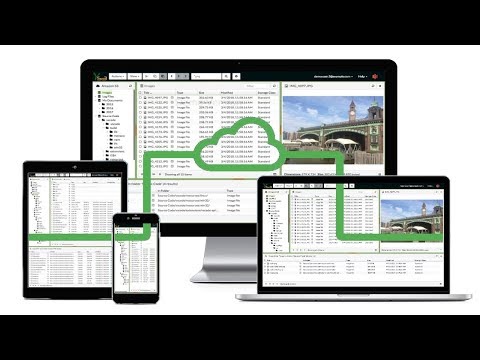
Yarkon is a modern, responsive and intuitive web based browser and document management solution for Amazon S3. It runs on any device without the need for any download or setup.
Use it to upload, download and share documents, manage buckets and create folders - anything that you normally do with S3 - with a fluent, intuitive and feature rich user experience. Drag & drop, context menus, copy-paste, image preview, multiple upload/download, it is all there.
Yarkon enables everyone in your organization to use your S3 storage without provisioning access to the AWS console/account and without sharing any sensitive keys with end users; all that while strictly following the permissions granted by the account administrator using the IAM service, and with full support to groups and roles.
Yarkon Enterprise Edition runs on a single instance in your account, without any external dependencies.
Up to 50 users.
Highlights
- 100% IN THE CLOUD - You only need a web browser. Nothing to download, nothing to install and you always have the latest version. Fast and responsive, works right and looks great on any device.
- AWS IAM INTEGRATION - Full access control management, activate and disable users as needed.
- 50 USER LICENSE INCLUDED - A cost effective option for a growing team. Contact us for different options.
Details
Sold by
Categories
Delivery method
Delivery option
AMI with CFT for Yarkon S3 Server - 50 Users
Latest version
Operating system
Ubuntu 24.04 LTS
Deployed on AWS
New
Introducing multi-product solutions
You can now purchase comprehensive solutions tailored to use cases and industries.

Features and programs
Financing for AWS Marketplace purchases
AWS Marketplace now accepts line of credit payments through the PNC Vendor Finance program. This program is available to select AWS customers in the US, excluding NV, NC, ND, TN, & VT.

Pricing
Pricing is based on actual usage, with charges varying according to how much you consume. Subscriptions have no end date and may be canceled any time. Alternatively, you can pay upfront for a contract, which typically covers your anticipated usage for the contract duration. Any usage beyond contract will incur additional usage-based costs.
Additional AWS infrastructure costs may apply. Use the AWS Pricing Calculator to estimate your infrastructure costs.
If you are an AWS Free Tier customer with a free plan, you are eligible to subscribe to this offer. You can use free credits to cover the cost of eligible AWS infrastructure. See AWS Free Tier for more details. If you created an AWS account before July 15th, 2025, and qualify for the Legacy AWS Free Tier, Amazon EC2 charges for Micro instances are free for up to 750 hours per month. See Legacy AWS Free Tier for more details.
Dimension | Cost/hour |
|---|---|
t2.micro | $0.50 |
c5.xlarge | $0.50 |
m5dn.large | $0.50 |
g4dn.16xlarge | $0.50 |
c5.large | $0.50 |
i3en.12xlarge | $0.50 |
m5n.metal | $0.50 |
m5dn.xlarge | $0.50 |
c5d.large | $0.50 |
c5d.xlarge | $0.50 |
Dimensions summary
This listing charges by the hour and covers use for up to 50 users. Pricing is set per running hour, and each row represents a different EC2 instance type you can run the software on. You pick the instance size that matches the compute, memory, or storage your deployment needs. The software's hourly charge stays the same across instance types; the instance choice mainly affects the separate AWS infrastructure cost you pay for the server. You only pay for the hours the service is actually running. Charges accumulate hourly and appear on your AWS bill.
Top-of-mind questions for buyers
This listing supports use by up to 50 active users. Users are the people accessing the document management software running on your server. Once your team exceeds 50 users, you would move to a listing that supports a larger user count, such as the 100-user or 200-user tier.
The software charge is metered per in-use hour, so it accrues only while the service is running. Stopped or powered-off instances do not add software charges. You may still pay separate AWS infrastructure fees, such as storage, while the instance is stopped. AWS calculates and collects all charges.
The software charge reflects the 50-user service tier, not the instance size. Every instance type on this listing carries the same hourly software rate. The instance you pick affects the separate AWS infrastructure cost you pay for compute, memory, and storage. That infrastructure cost is billed by AWS, not by the vendor.
yarkons3.com
Helpful?
Vendor refund policy
We don't currently offer refunds, but you can cancel your hourly based subscription at any time.

Legal
Vendor terms and conditions
Upon subscribing to this product, you must acknowledge and agree to the terms and conditions outlined in the vendor's End User License Agreement (EULA) .
Content disclaimer
Vendors are responsible for their product descriptions and other product content. AWS does not warrant that vendors' product descriptions or other product content are accurate, complete, reliable, current, or error-free.
Delivery details
AMI with CFT for Yarkon S3 Server - 50 Users
This CloudFormation template will launch a single EC2 instance in your VPC, running the Yarkon S3 Admin Console. IAM Role and policy for the EC2 instance are automatically created, as well as the security groups requires to allow access to the EC2, and allow SSH access to the administrator from a secure IP.
CloudFormation Template (CFT)
AWS CloudFormation templates are JSON or YAML-formatted text files that simplify provisioning and management on AWS. The templates describe the service or application architecture you want to deploy, and AWS CloudFormation uses those templates to provision and configure the required services (such as Amazon EC2 instances or Amazon RDS DB instances). The deployed application and associated resources are called a "stack."
Version release notes
Additional details
Usage instructions
Access the application via a browser at http://<public_dns>:80. To connect to the operating system, use SSH and the username ubuntu.
Support
Vendor support
Please allow 24 hours
AWS infrastructure support
AWS Support is a one-on-one, fast-response support channel that is staffed 24x7x365 with experienced and technical support engineers. The service helps customers of all sizes and technical abilities to successfully utilize the products and features provided by Amazon Web Services.
Updated weekly
By Yarkon

By Thorn Technologies LLC

By JPCYBER, Inc.
AI generated from product descriptions
Web-Based Access Interface
Responsive web-based browser accessible from any device without requiring downloads or installations
Amazon S3 Integration
Direct integration with Amazon S3 for bucket management, document upload, download, sharing, and folder creation
IAM Access Control
Full integration with AWS IAM service for permission-based access control, user activation/deactivation, and support for groups and roles
File Management Operations
Support for drag-and-drop functionality, context menus, copy-paste operations, image preview, and multiple concurrent upload/download capabilities
Self-Hosted Deployment
Single instance deployment within customer's AWS account with no external dependencies required
Web-Based File Transfer Interface
Drag-and-drop functionality for uploading and downloading files directly to cloud storage locations through a web browser
Cross-Cloud Storage Compatibility
Support for connecting to private S3 buckets and other cloud storage locations across multiple cloud providers
Access Control and Authentication
User-friendly dashboard for managing access privileges with support for OIDC authentication provider integration
Data Protection
Data encryption at rest and in transit to protect shared files
Brand Customization
Ability to integrate company logo and customize the portal interface to match corporate branding and identity
S3 Bucket Mounting
Mounts Amazon S3 buckets as local drives on Windows operating systems
Multi-Application Compatibility
Supports access through Windows Explorer, Windows PowerShell, and other Windows applications
Japanese Language Support
Supports Japanese filenames and Japanese OS environments with full compatibility
Operating System Support
Compatible with Windows 11, Windows 11 ARM, and Windows Server 2016, 2019, 2022, and 2025
Framework Requirements
.NET Framework 4.7.2 or above required with version 4.8.1 recommended
Standard contract
No
No
No
Customer reviews
Vinay Rachh
Document access has become secure and centralized and now saves significant IT team effort
Reviewed on Sep 03, 2026
Review provided by PeerSpot
What is our primary use case?
Yarkon serves as our main tool, and our IT team uses it extensively to develop applications and for remote administration of our products.
A specific example of how our IT team uses Yarkon for remote administration and app development is that we were conducting consolidation across our other business verticals, and we realized that we did not have a proper document management solution. That is when we acquired Yarkon, which enabled us to consolidate many documents in one place.
We have been using Yarkon for a year, and it has been performing well. We have not faced any issues so far.
What is most valuable?
The best features Yarkon offers include strong security and excellent AWS native access, which is very important for our organization. Additionally, Yarkon does not require client installation.
The secure AWS native access makes things easier for my team because our credentials, SSOs, and authentication information are very secure and under our control. Since Yarkon does not require client installation, it can be used directly from the browser, which helps us limit the load on our server since there is no need for multiple software installations on everyone's desktops.
Yarkon has positively impacted our organization by making things easier for everyone, helping business users understand and review the data and documents available across the databases.
Yarkon has made things easier for business users by saving considerable time for the team, especially for the IT staff, as it reduces manual effort significantly.
What needs improvement?
Yarkon has all the required features that it promises as a product, so I do not see any improvement areas at this time.
I cannot recall anything specific regarding needed improvements.
We are satisfied with Yarkon so far, and there are no improvements needed.
For how long have I used the solution?
We have been using Yarkon for a year.
What do I think about the stability of the solution?
Yarkon appears to be stable. I have not been informed of any downtime or reliability issues, but if there were something like that, it would have definitely been highlighted to the team.
What do I think about the scalability of the solution?
Yarkon has shown good scalability. We have been able to consolidate across multiple regions, and it has grown and handled the increased workloads well.
How are customer service and support?
I have not interacted with customer support directly, but the IT team interacts with them regularly. As far as I know, the support has been good.
Which solution did I use previously and why did I switch?
I did not previously use a different solution. This was the first time that we deployed a solution like Yarkon.
What was our ROI?
We have seen a good return on investment. It is too early to provide specific numbers since it has only been a year since we deployed Yarkon, but we do see considerable improvement in terms of time saved. We are not terminating anyone from IT because we have a document software in place, but time has definitely been saved.
What's my experience with pricing, setup cost, and licensing?
Pricing was a very important factor before deciding on Yarkon, but the team was very cooperative and helped us understand our requirements, allowing us to negotiate better pricing and licensing terms.
Which other solutions did I evaluate?
I was not part of the process where other vendors were evaluated, as that was conducted by the procurement team. Since I work in finance, this came to me when the final decision was happening at the negotiation stage. I am sure they would have evaluated a couple of other vendors.
What other advice do I have?
My advice to others looking into using Yarkon is that it is up to each organization to evaluate and determine what best suits their needs. For my organization, we have been using Yarkon and I have no complaints. I would rate this product an 8 out of 10.
Which deployment model are you using for this solution?
Public Cloud
If public cloud, private cloud, or hybrid cloud, which cloud provider do you use?
Amazon Web Services (AWS)
Trey Rouse
Easy installation, configuration, and maintenance; Stellar support
Reviewed on May 04, 2018
Review from a verified AWS customer
Yarkon is a great solution for extending S3 access to non-AWS users. The installation is dead simple, the configuration process is straightforward and mostly uses AWS tools. The user administration tools make it a snap to add users, configure their access, and allow them to change their passwords.
A special note has to be made for the level of support that they provide. The support team is responsive, receptive, and offers prompt and decisive solutions to problems.
After several months in our production environment, I would recommend Yarkon without any reservation.