AWS Public Sector Blog
Architecting secure AI sandboxes in AWS GovCloud (US)
Please note that the following post is intended for informational purposes only. The approach detailed below may not be suitable for all organizations and/or compliance programs. It is important to evaluate this potential solution against the compliance needs of your organization and any applicable regulatory obligations you may have.
Generative (AI) adoption is transforming how public sector organizations work. However, government agencies and their partners face unique challenges when adopting these technologies, including stringent data privacy requirements, regulatory compliance programs such as Federal Risk and Authorization Management Program (FedRAMP), and the need to operate within isolated environments that meet federal security standards.
Our previous post on the AWS Public Sector Blog, Empowering the public sector with secure, governed generative AI experimentation,” introduced the Generative AI Sandbox on Amazon Web Services (AWS) powered by Amazon Bedrock in SageMaker Unified Studio and Amazon DataZone. Organizations operating in AWS GovCloud (US) might require alternative architectural approaches, depending on service availability in their target Region. This post presents an architecture that’s deployable on AWS GovCloud (US) for secure generative AI experimentation using Amazon SageMaker AI, AWS Lake Formation, and Amazon Bedrock.
Key considerations for AWS GovCloud (US) environments
Public sector organizations typically face three key considerations when adopting generative AI:
- Data privacy and security – Government agencies and partners handle sensitive citizen data requiring governance protocols.
- Compliance Frameworks – Regulations may constrain permissible use cases, and customer solutions might need to meet FedRAMP, Department of Defense Cloud Computing Security Requirements Guide (DoD CC SRG), and/or International Traffic in Arms Regulations (ITAR) requirements.
- Skills and capability gaps – Organizations often lack in-house AI and machine learning (ML) expertise to effectively deploy and maintain generative AI systems.
AWS GovCloud (US) Regions have high-level differences compared to standard AWS Regions, and it’s important to evaluate these differences when designing your architecture. Before implementing any solution, consult the current AWS GovCloud (US) Documentation to verify service availability and feature parity for your specific requirements.
Solution overview
The Generative AI Sandbox on AWS GovCloud (US) provides a secure, governed, and isolated environment for organizations to explore large language models (LLMs) and other generative AI capabilities. Users can use this sandbox to create customized AI assistants and enhance LLM interactions by incorporating their organization’s proprietary data and documentation. Built on AWS GovCloud (US) services, the solution helps users of all skill levels get hands-on with generative AI while reducing the overhead of data management, model governance, and infrastructure operations.
Required capabilities
When designing a generative AI sandbox for AWS GovCloud (US) environments, organizations must address several key capabilities. The following list outlines key capabilities and ways they might map to AWS GovCloud (US) services and capabilities:
- Authentication – Organizations can implement presigned URLs generated through AWS Lambda that validate SAML assertions or JSON Web Tokens (JWTs) against the organization’s existing identity provider (IdP), enabling a single sign-on–like experience while maintaining security requirements.
- Workspace isolation – Amazon SageMaker AI in AWS GovCloud (US) uses domains and shared spaces to provide organizational boundaries for teams and projects, supporting separation between departments and lines of business under distinct security, networking, and policy configurations.
- Data governance – AWS Lake Formation combined with AWS Glue Data Catalog provides centralized fine-grained access control for data in Amazon Simple Storage Service (Amazon S3), including database-, table-, column-, row-, and cell-level access control.
- Access control and permissions – AWS Lake Formation permissions work together with AWS Identity and Access Management (IAM) permissions and tag-based or attribute-based access control (ABAC) to enforce least-privilege access to governed data for different ML and data science teams.
- Secure network connectivity – AWS PrivateLink and Amazon Virtual Private Cloud (Amazon VPC) interface endpoints keep communication between the customer virtual private cloud (VPC) and AWS managed services within the AWS network and prevents it from traversing the public internet.
- Foundation model access – Amazon Bedrock provides access to foundation models (FMs) with enterprise-grade security controls and data isolation, enabling development and testing of generative AI applications in a compliant environment.
- Experimentation environment – Amazon SageMaker AI Studio notebooks provide a code‑first sandbox, where users can run Jupyter-based notebooks and integrate generative AI calls (for example, to Amazon Bedrock) directly from notebooks; organizations can standardize on curated notebooks for chat-based assistants, Retrieval Augmented Generation (RAG) patterns, and other generative AI workflows.
- Compliance and audit – AWS CloudTrail and AWS Config capture API activity and configuration changes, supporting continual monitoring, compliance reporting, and investigations.
- Data privacy and security – With Amazon Bedrock, customer data isn’t used to train the underlying FMs or shared with model providers, and organizations should enforce encryption at rest and in transit along with strong tenant-isolation patterns on storage and network layers.
With our desired capabilities and solutions identified, we can now examine how these components come together architecturally in AWS GovCloud (US). Each capability identified in the preceding list is labeled 1–9 in the following architecture.
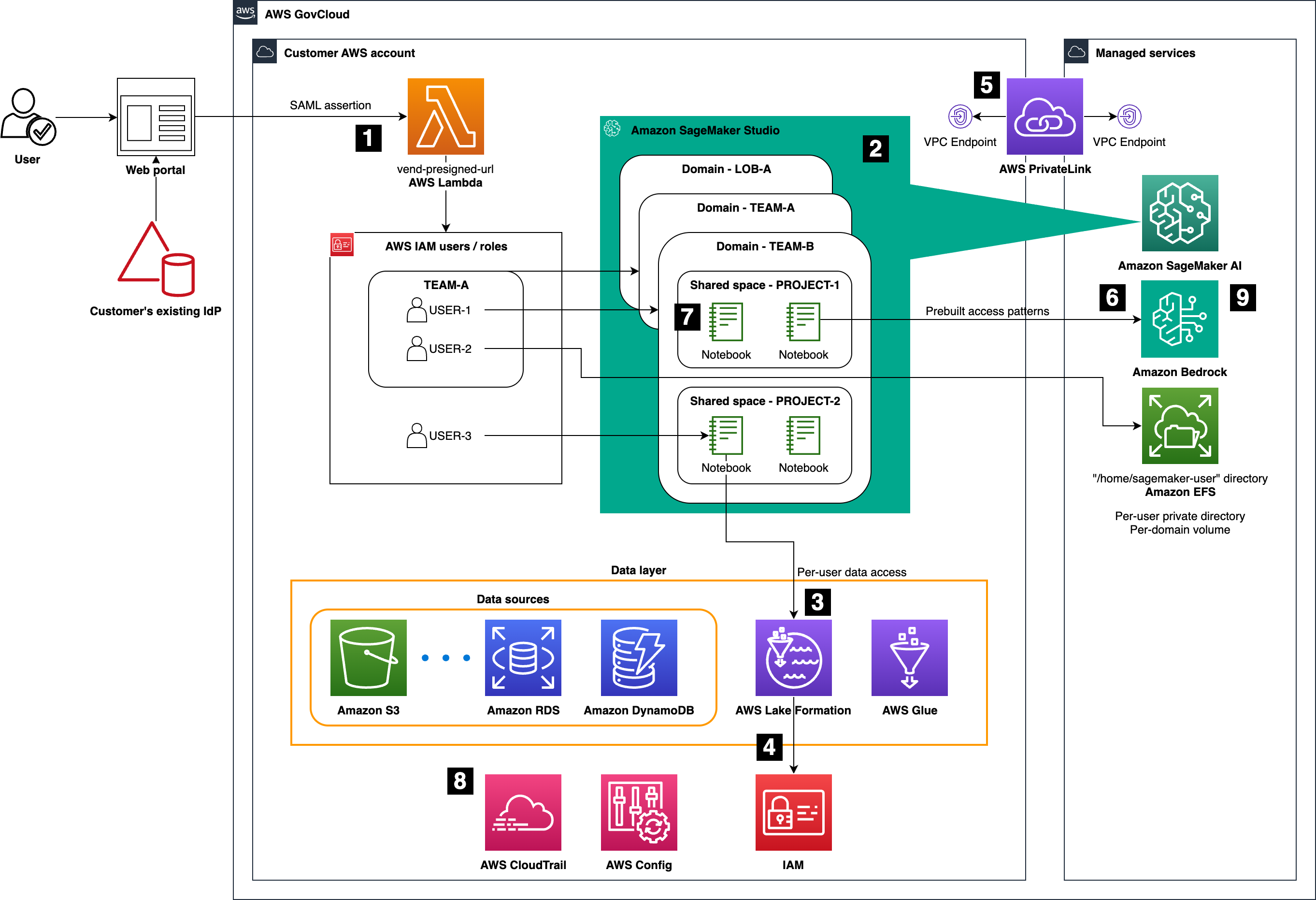
Figure 1: High-level architecture of the Generative AI Sandbox on AWS GovCloud (US), highlighting Amazon SageMaker AI Studio, AWS Lake Formation, AWS Glue, Amazon Bedrock, and supporting services
Authentication and access
Authentication is implemented using presigned URLs generated by an AWS Lambda function, which validates the requester’s identity—for example, using SAML or OpenID Connect (OIDC) federation into IAM roles—before granting time‑bound access to SageMaker AI Studio. Organizations can use this pattern to preserve existing organizational credential flows while centralizing trust in IAM roles and policies.
Users are mapped to roles that reflect team memberships and responsibilities, which means security teams can enforce least-privilege access through role-based access control and—where appropriate—tag-based conditions for finer-grained policy decisions.
Data layer and governance
AWS Lake Formation acts as the governance layer over data stored in Amazon S3 and metadata defined in AWS Glue Data Catalog. Lake Formation permissions, in combination with IAM, provide centralized fine-grained controls down to database, table, column, row, and cell levels for governed datasets.
To use Lake Formation from SageMaker AI Studio, administrators register SageMaker AI Studio execution roles as Lake Formation data lake principals. From there, users can access governed data using:
- Query engines such as Amazon Athena directly from notebooks
- Built-in connectivity to Amazon EMR using runtime roles
- AWS Glue interactive sessions with built-in notebook kernels
This pattern allows the sandbox to expose rich datasets to users while maintaining strong access controls and auditability.
Workspace organization: Domains and shared spaces
Amazon SageMaker AI Studio organizes user resources using domains and shared spaces:
- Domains — A SageMaker AI Studio domain is the top-level construct that defines the Studio environment in an account and Region, including an associated Amazon Elastic File System (Amazon EFS) volume, the list of user profiles, and the security, application, policy, and Amazon VPC configurations. Within each domain, each user profile gets an isolated home directory on that shared EFS volume, and all users and their Studio apps operate within the same network and security boundary defined by the domain.
- Shared spaces — A SageMaker AI Studio shared space is a collaborative area created within a single domain that provides a shared directory on the domain’s EFS volume so multiple user profiles can coedit notebooks and share files in near real time. Access to a shared space is controlled by space membership and its associated permissions and execution role, with data separation enforced through filesystem permissions and IAM on the shared EFS volume rather than separate storage or network boundaries.
Use domains and shared space to collaborate in a way that aligns best with your organization’s requirements. Domains align to security and tenancy requirements, and shared spaces align to teams or projects that need to collaborate within a given domain. One practical pattern is:
- Use one domain per line of business or other hard isolation boundary where you need separate authentication modes, VPCs, network controls, or IAM guardrails.
- Within each domain, create one shared space per project or per product team, so that all collaborators share notebooks, code, and artifacts in that space while inheriting the domain’s network and security settings.
End‑to‑end access and permissions model
Bringing these pieces together, the relationship between SageMaker shared spaces, execution roles, and Lake Formation governed data access can be broken down into a complete permissions model as follows:
- Space access – All user profiles in a SageMaker domain can open and work in shared spaces in that domain, provided they have IAM permissions to list and access those spaces.
- Base permissions – After they’re in a shared space, users operate under the space’s default execution role for general AWS resource access.
- Data-specific permissions – When accessing Lake Formation governed data from workloads in a shared space, Lake Formation evaluates permissions for the IAM role used by that workload (typically the space’s execution role), which is configured as or treated as a DataLakePrincipal.
- Audit trail – All Lake Formation governed data access can be audited in CloudTrail, where Lake Formation API events such as
lakeformation:GetDataAccessrecord which IAM principal accessed which governed resources and when.
To best demonstrate this permissions model, the following visual presents an example permissions layout for a fictitious federal agency (“Example Corp”) that organizes SageMaker domains and shared spaces around business divisions and teams. It highlights how each shared space is associated with its own execution role and scoped Lake Formation governed datasets.
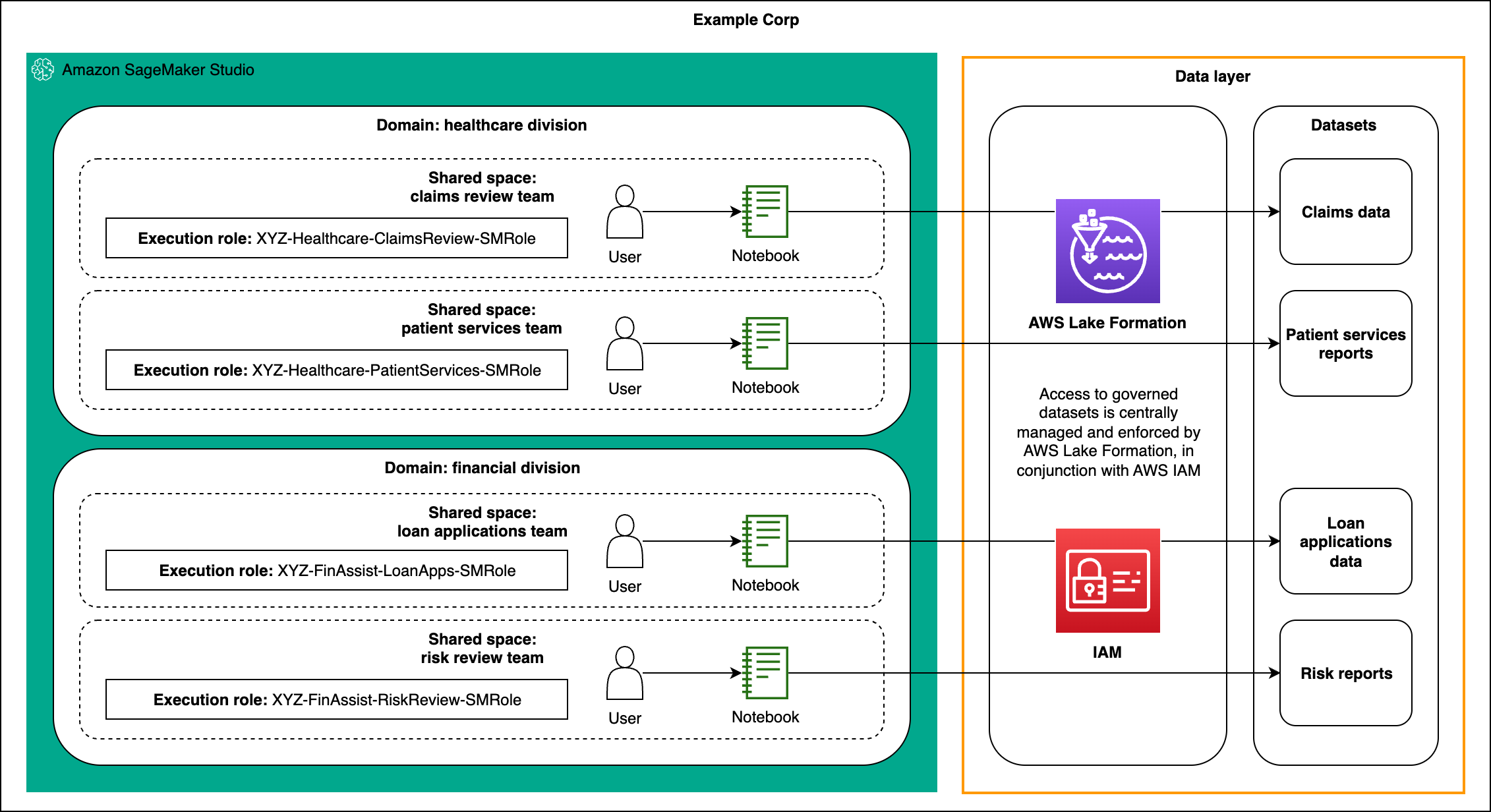
Figure 2: Example organizational layout for Example Corp using SageMaker Studio domains and shared spaces, showing healthcare and financial domains, each with multiple shared spaces that use distinct execution roles mapped to Lake Formation governed datasets.
Secure network connectivity
All communication between workloads in the customer VPC and supported AWS managed services (such as SageMaker APIs, Amazon S3, AWS Glue, and Amazon Bedrock) is routed through VPC endpoints, most often using AWS PrivateLink powered interface endpoints and gateway endpoints where applicable. This approach keeps traffic within the AWS GovCloud (US) network and supports stricter compliance requirements around outbound internet traffic.
Foundation model access
Amazon Bedrock in AWS GovCloud (US) provides managed access to a curated set of FMs under a fully managed, security-focused control plane. From Studio notebooks or other clients in the sandbox, teams can call Amazon Bedrock APIs to experiment with prompt engineering, RAG patterns, and agent-like flows without managing model infrastructure
Orchestrated workflows with AWS Step Functions and SageMaker Pipelines
In addition to interactive experimentation in notebooks, organizations can optionally add an orchestration layer using AWS Step Functions and, where appropriate, Amazon SageMaker Pipelines. These services define repeatable, multistep workflows that connect data preparation, embedding or feature generation, model invocation, and downstream evaluation into a single, traceable process. Step Functions is typically the first choice for Amazon Bedrock based flows because it’s lightweight, event-driven, and integrates easily with AWS Lambda, Amazon Bedrock APIs, and other services, whereas SageMaker Pipelines is best suited when you need ML-focused constructs (such as processing and training steps) and continuous integration and continuous delivery (CI/CD)-style governance around hybrid ML plus generative AI workflows.
In a generative AI sandbox, a workflow could orchestrate tasks that call Amazon Bedrock for prompt-engineering experiments, batch inference, or RAG. For example, one orchestrated flow might ingest and cleanse source documents, generate embeddings using an Amazon Bedrock embedding model, persist vectors into a database or vector index, and then call Bedrock FMs for question answering or summarization. In most Bedrock only scenarios, this can be implemented as a Step Functions state machine that coordinates Lambda functions and Bedrock calls, whereas SageMaker Pipelines is reserved for more ML-heavy use cases where you combine traditional data processing or model training steps with generative AI operations inside a single governed pipeline definition.
The following graphic shows an example AWS Step Functions state machine for an Amazon Bedrock based workflow. It illustrates how a user request or scheduled event triggers a state machine that coordinates a Lambda function for data retrieval and preprocessing and an Amazon Bedrock invocation step for LLM inference before storing results or returning a response.
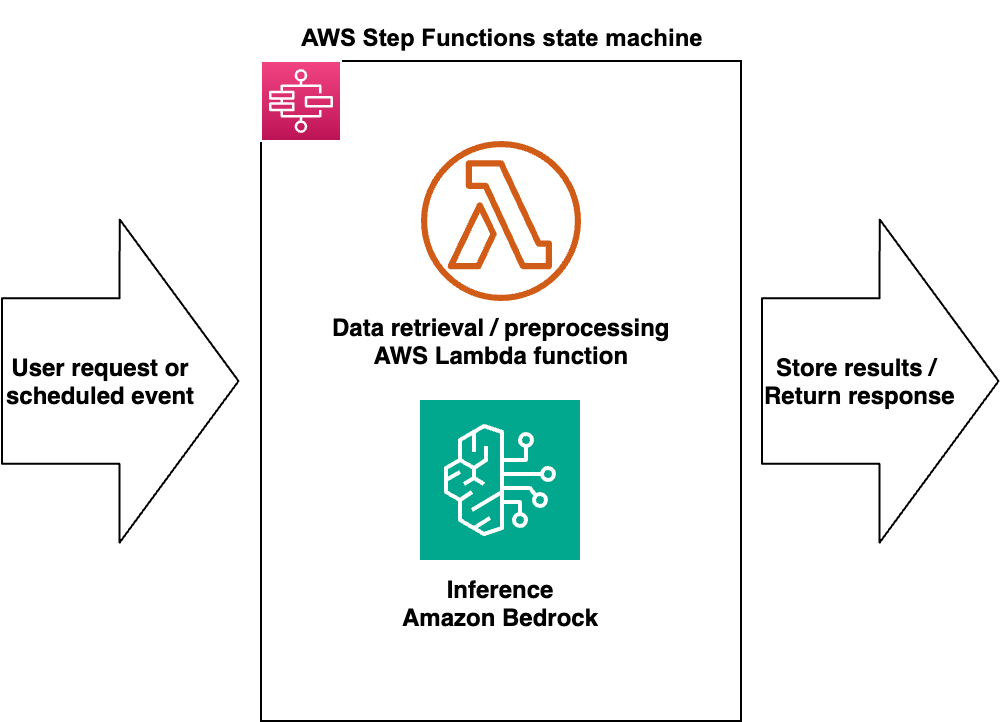
Figure 3: Example AWS Step Functions state machine for an Amazon Bedrock based workflow
The following graphic shows an example Amazon SageMaker Pipeline for a RAG workflow, showing sequential steps for data preparation, embedding generation, vector persistence, LLM inference with FMs, and evaluation and logging, all defined as SageMaker Pipeline steps within a single pipeline definition.
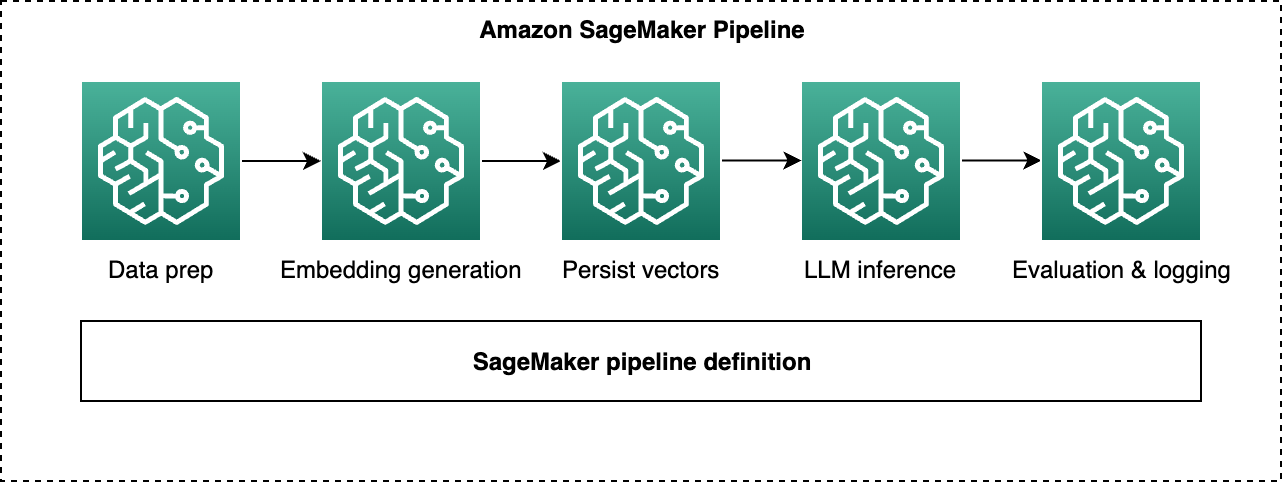
Figure 4: Example Amazon SageMaker Pipeline
Best practices
This architecture represents one recommended pattern for a generative AI sandbox in AWS GovCloud (US) but is not the only possible design. Consider the following best practices for future optimizations:
- Performance optimization – Use SageMaker AI Studio notebooks with AWS Glue interactive sessions, Amazon EMR integration, or Amazon Athena for scalable data processing. Tune instance types and auto scaling policies to match workload profiles.
- Cost management – Use tags on SageMaker domains, shared spaces, and Lake Formation resources to track spend per project or team. Use the Amazon Bedrock on-demand pricing model along with quotas and budget alerts to control experimentation costs.
Get started
To begin your generative AI journey in AWS GovCloud (US):
- Provision an isolated AWS GovCloud (US) account following AWS multi-account and security best practices.
- Configure IAM based authentication and federation and implement presigned URL or similar controlled access patterns to Studio.
- Set up SageMaker Studio domains aligned with organizational and tenancy boundaries, then create shared spaces aligned with teams and projects.
- Onboard governed datasets into Lake Formation and AWS Glue Data Catalog and integrate Studio with governed access.
- Explore AWS generative AI workshops, reference architectures, and AWS GovCloud (US) specific documentation to iterate on the sandbox design over time.
Conclusion
This AWS GovCloud (US) architecture provides a secure environment for generative AI experimentation focused on development and sandbox use cases. By combining the SageMaker AI Studio domain and shared space constructs with Lake Formation fine-grained access controls and Amazon Bedrock managed FM access, organizations can enable systematic experimentation while meeting the security expectations of federal workloads.
Teams can rapidly prototype, collaborate, and share successful patterns within a controlled workspace, accelerating the path from exploration to production-ready solutions on AWS GovCloud (US).
Additional resources
Explore these additional resources to continue learning about how AWS can help power your generative AI solutions: