Migration & Modernization
Seamlessly modernize your mission-critical applications on AWS
Introduction
Organizations are modernizing their mission-critical systems on AWS to drive competitive advantage and meet evolving market demands. The drivers are clear with benefits such as increased scalability, improved application performance and reliability, accelerated time to market for new features, and advance AI/ML capabilities. Unlike traditional upgrades, application modernization is a fundamental shift in how organizations approach software development, architecture, security, innovation, and operations. While AI based services have made modernizing applications even easier, maximizing value while minimizing risk requires a holistic approach. This blog post outlines a typical customer journey for modernizing mission critical applications.
End-to-end customer journey
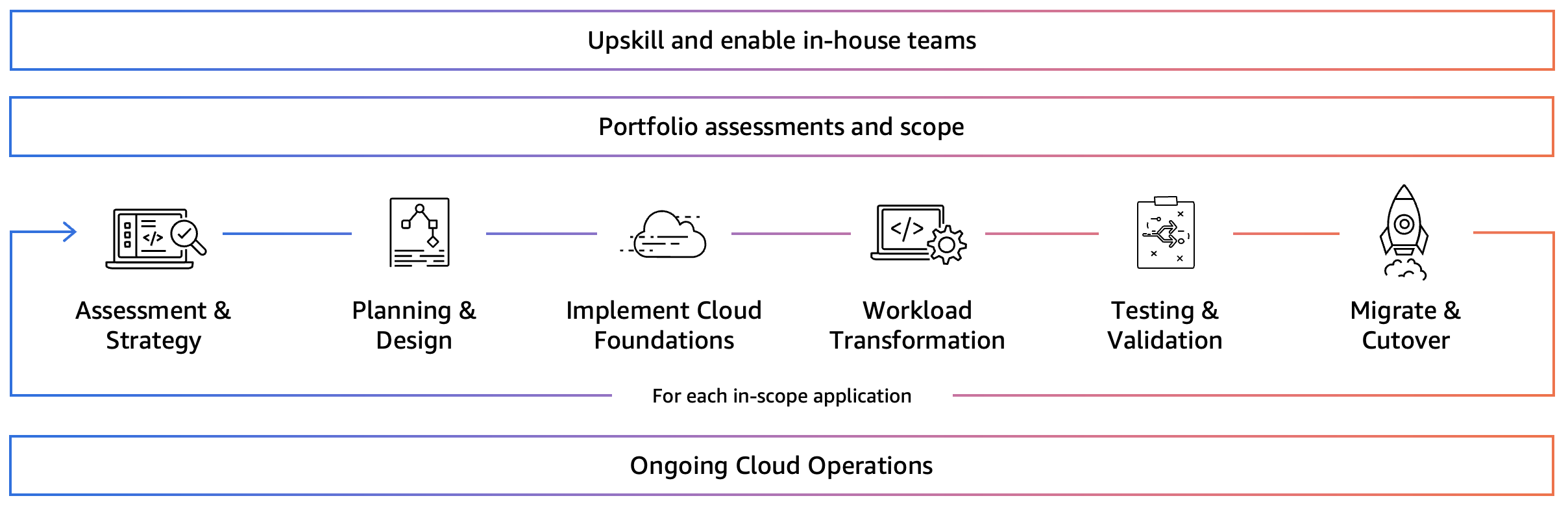
The following diagram outlines a typical customer journey for modernizing mission critical workloads on AWS, let’s examine each component.
Upskill and enable in-house teams
While technology enables innovation, people make it happen. Your teams need to confidently make decisions, architect solutions, implement capabilities, develop code, and operate the transformed workloads. Organizations should focus on upskilling in-house teams early in the modernization project, and we recommend the AWS Learning Needs Analysis (LNA) to gain insights into your organizations existing cloud skills.
Portfolio assessment and scope
Defining your modernization scope requires strategic analysis of your application portfolio. While you might have multiple applications in mind, it’s important to understand the individual components and whether core dependencies also need to be modernized to achieve the desired business outcomes. Ensure you remain focused on your modernization drivers during this stage to select the required scope.
Application assessment & strategy
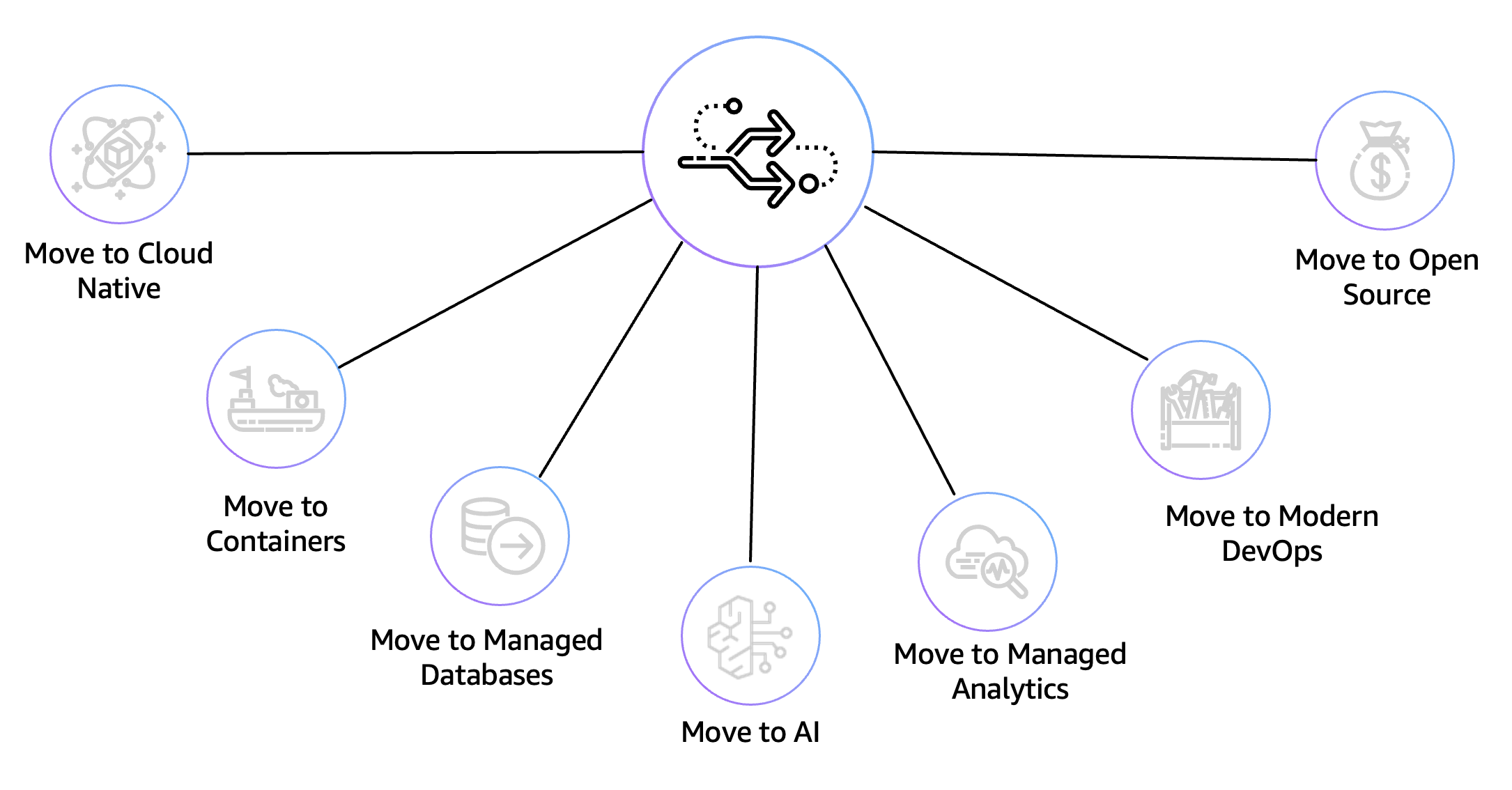
With scope defined, the next step is to determine the modernization strategy. The goal here isn’t to tackle everything at once; you want to select a directional strategy for each component and agree on the approach with relevant stakeholders. We recommend leveraging the Modernization Pathways to simplify this process. By allocating a directional modernization strategy early, you’re able to become more targeted on the application assessments and in-house team enablement. For example, if you’re transforming your .NET applications to open source, you might consider leveraging AWS Transform to analyze your codebases from your source control systems.
Planning & design
The planning and design phase is where organizations create detailed architectures and implementation roadmaps for each in-scope application. For custom-built applications with limited documentation, discovery tools like CAST help accelerate this phase by automatically mapping out dependencies in code, recommending modernization pathways, and creating a dynamic knowledge base that can be leveraged by your in-house teams and AWS Transform. We recommend applying an incremental modernization approach with frequent value drops to simplify your end-to-end journey. For example, you might begin by migrating your database tier to Amazon Relational Database Service (RDS), then progress to implementing modern DevOps practices, and finally transition to a microservices architecture.
Implement foundations (for new AWS customers)
Before you can migrate workloads to the cloud, you’ll need to implement your AWS foundations. This includes creating a well-architected, secure, and scalable multi-account environment (also known as an AWS landing zone), establishing network connectivity, and building the shared services your applications require. We recommend checking out the Landing Zone Accelerator on AWS solution to simplify this step which deploys a foundational set of capabilities designed to align with AWS best practices and multiple global compliance frameworks. With this AWS Solution, you can better manage and govern your multi-account environment that have highly regulated workloads and complex compliance requirements.
Workload transformation
The transformation phase involves modernizing in-scope applications and infrastructure aligned to the target architectures. AI is rapidly changing this phase to accelerate and simplify the entire software development lifecycle through generative AI-powered tools. Tools such as Kiro are revolutionizing how software is modernized by turning prompts into detailed specs – then into working code, documentation, and tests. We recommend checking out how AI powered tools can be used to simplify and accelerate your application transformation.
Testing & validation
Sufficient testing is required before deploying the modernized application into production. This phase commonly includes functional testing to verify business requirements, performance testing to validate scalability and responsiveness, security testing to ensure compliance and protection of sensitive data, resilience testing to validate recovery objectives, and integration testing to confirm seamless interaction between components. To simplify this phase consider using the Amazon Q Developer AI-powered unit test generation capability that automates the creation of unit tests throughout the software development lifecycle. If you have compliance requirements such as PCI DSS or HIPAA, AWS Security Assurance Services (AWS SAS) provides access to experienced auditors combined with AWS technical depth to support with your compliance requirements.
Migrate & cutover
During this phase any required data is migrated, and traffic is cutover to the newly deployed application stack. This could include implementing a canary rolling deployment where a new version is rolled out to a subset of ushttps://aws.amazon.com/datasync/features/ers to test against the current version. We recommend utilizing AWS Database Migration Service (DMS) for database migrations, AWS DataSync for online data movement, and AWS Route 53 for DNS management and traffic routing.
Ongoing cloud operations
Each migrated workload needs to be operated by a team with AWS knowledge and experience to ensure smooth operations. We recommend conducting game days to simulate events in production like environments to test systems, processes, alerting capabilities, and team responses. AWS Managed Services (AMS) can provide interim operational support to enable an accelerated modernization timeline and free your teams from day-to-day cloud operations, such as monitoring, incident and problem management, patching, backups, and security management.
Conclusion
This blog post provided an overview of a typical customer journey when modernizing mission critical applications. By understanding each component of the journey, you can better minimize disruption and maximize the strategic value of your cloud transformation. Reach out to your AWS Account Manager to learn more about how AWS Professional Services and AWS Partners can supercharge your application modernization initiative.