IBM & Red Hat on AWS
Maximizing the Value of Red Hat OpenShift on AWS
Red Hat OpenShift Service on AWS (ROSA) is a turnkey platform built by Red Hat and AWS to help you build and manage containerized applications while reducing infrastructure management overhead. ROSA provides integrated tools for application development, container orchestration, and deployment automation. Recent updates include the ability to manage virtual machines on bare metal instances side by side with your containers, as well as AI model deployment support.
This blog post will walk you through some of the steps you can take to reduce the total cost of running ROSA, while maximizing operational efficiency, to capture ROSA’s unmatched return on investment. Whether you aim to deploy containers, virtual machines, or both, you’ll learn specific strategies for optimizing both ROSA Subscription fees and the underlying AWS infrastructure costs.
The total cost of deploying ROSA can be broken down into two key components: the Red Hat Subscription fee and AWS infrastructure charges. ROSA service fees accrue on demand at an hourly rate of $0.171 per 4 vCPU used by worker nodes or by contractual consumption. AWS infrastructure charges include fees for the underlying worker nodes, storage, and networking components. The minimal EC2 footprint for a multi-Availability Zone (AZ) ROSA deployment for ROSA is just 2 worker nodes.
ROSA Procurement Methods
ROSA currently offers two deployment models, each with different cost implications:
ROSA Classic: ROSA Classic is the original deployment model for managed OpenShift on AWS. In Classic, users are required to provision and manage resources for the control plane, which runs in the same AWS account as the worker nodes, adding additional complexity even when managed perfectly. If managed imperfectly, the control plane can be under or over provisioned, resulting in performance degradation or unnecessary additional costs, respectively.
ROSA Hosted Control Plane (HCP): ROSA HCP is the preferred deployment model for managed OpenShift. With HCP, the control plane is hosted in a service team account. This model eliminates customer responsibility for managing or paying for the control plane nodes and associated AWS infrastructure, in favor of an HCP management fee included in the ROSA license. However, even with the additional HCP fee, the overall cost of running the ROSA cluster decreases significantly.
It is, however, worth noting that at the time of writing this article, both versions are fully supported. As of April 2026, ROSA Classic is will be discontinued from new deployments. Existing clusters will be maintained, but no new clusters will be able to be deployed in this model. For more information, see the following article from Red Hat.
The following diagram (Figure 1) shows a comparison of ROSA Classic and HCP pricing. Full details of the pricing models can be found on the ROSA Pricing page.
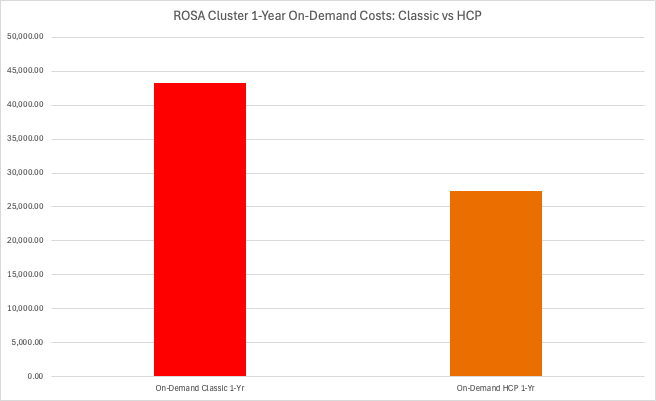
Figure 1: Comparison on ROSA Classic and HCP On-Demand costs
The estimated costs for ROSA Classic and HCP clusters running on 10 general-purpose Amazon EC2 a1.xlarge instances, purchased on-demand over one year, are as follows:
- ROSA Classic: $43,234
- ROSA HCP: $27,334
In this scenario, the HCP deployment offers a 37% cost reduction.
As mentioned previously, ROSA worker nodes have a service fee per 4 vCPU (Figure 2)

Figure 2: ROSA worker node service fees yearly cost
After selecting either the ROSA Classic or Hosted Control Plane (HCP) deployment model, choose your subscription pricing model: on-demand or contract (1-year or 3-year). On-demand pricing is $1500 per worker node per 4 vCPU for one year. With a 1-year contract, this price can be reduced to $1000/year, and with a 3-year contract, it can be further lowered to $667/year.
Note: 3-year contracts are currently exclusive to private offers from Red Hat and cannot be procured from the AWS Marketplace. To obtain these offers, contact a Red Hat representative or email aws-redhat-partnerteam@amazon.com. Additionally, discounts of up to 75% on the service fee are available for customers migrating existing non-ROSA OpenShift and select IBM workloads to ROSA.
While on-demand pricing offers flexibility, committing to a contract can provide significant cost savings. On-demand pricing may benefit those with unpredictable, spiking workloads or frequent downtime. However, if you can predict your resource needs, perhaps after a proof of concept (POC) or trial period, substantial savings can be achieved through a private offer from Red Hat.
For example, consider a deployment with 10 worker nodes using a1.xlarge instances (4 vCPUs each) without a private offer. The ROSA service fee accrues at an hourly rate of $0.171 per 4 vCPU, resulting in a total cost of $1500/node or $15,000/year. With a 1-year contract, this could be reduced to $1000/node or $10,000/year, saving $5000 annually. A 3-year commitment would further lower the cost to $6,670 per year.
While the savings in this example may seem modest, they can be substantial at scale, making it a critical cost-saving opportunity for larger deployments.
Underlying Infrastructure cost considerations and optimizations
Now that we’ve discussed the Red Hat portion of the ROSA cost, it’s time to delve into the AWS side, starting with EC2.
Similar to ROSA, Amazon EC2 offers multiple purchasing options. You can choose On-Demand instances with no long-term commitment or opt for Reserved Instances through 1 or 3-year contracts. Amazon EC2 also offers a third option: Spot instances.
On-Demand instances follow a pay-as-you-go model, where you can launch and terminate instances as needed, with pricing based on the instance uptime and resource consumption. While On-Demand instances provide flexibility, they don’t include discounts, making them suitable for workloads that are inconsistent, yet require high availability.
Reserved Instances (RIs) operate through contractual commitments, similar to ROSA worker nodes. By committing to specific instance attributes (instance type, region, and operating system) for one or three years, you can reduce costs by up to 70%. While RIs require more specific commitments, they offer some flexibility through features like size flexibility and regional RIs. These instances work well for stable, predictable workloads and provide protection against potential pricing changes during the commitment period.
There’s actually one more instance model called Spot instances, but we’ll dive into that a little later. For more information on the differences between on-demand and reserved instances, see the full breakdown here.
AWS Savings Plans offer an alternative to RIs with two options that can both be applied as either 1 or 3-year commitments:
- Compute Savings Plans: These can provide up to 66% savings with maximum flexibility, automatically applying to Amazon EC2 usage regardless of:
- Instance family
- Size
- Availability Zone
- Region
- Operating system
- Tenancy
- EC2 Instance Savings Plans: These plans offer higher savings (up to 72%) but are specific to instance families within a region. They maintain flexibility for instance sizes and operating systems within the chosen family.
The following graph (Figure 3) highlights how these options enable you to balance cost savings and flexibility based on your specific requirements.
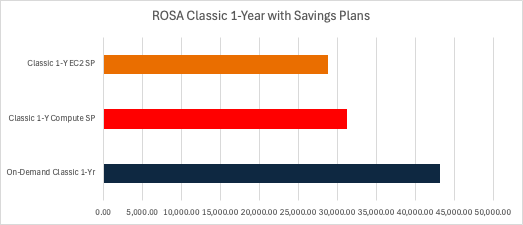
Figure 3: ROSA classic cost comparison with 1-year savings plans
The comparison illustrates three ROSA procurement models over a one-year period. A deployment using 10 Amazon EC2 a1.xlarge instances with On-Demand pricing would cost approximately $43,234. The same cluster deployed using a Compute Savings Plan would reduce the cost to approximately $31,299, while an EC2 Instance Savings Plan would further lower it to approximately $28,776. That’s about $12,000-$15,000 saved per year for this deployment, or about 30% of your total bill in this case.
Now let’s illustrate (Figure 4) the cost differences when using a 3-year savings plan
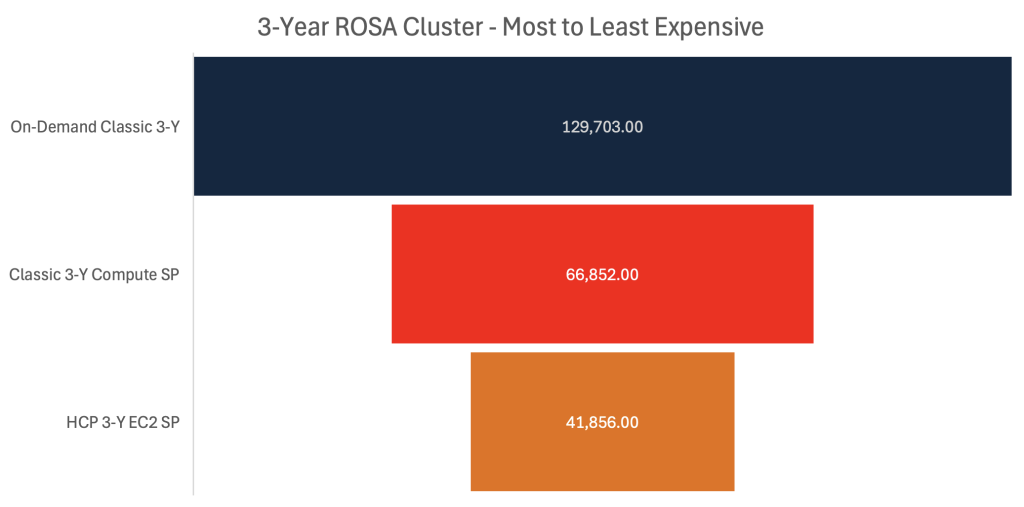
Figure 4: Comparison on ROSA Classic and HCP On-Demand costs
In this comparison we are modeling a ROSA cluster running 10 Amazon EC2 a1.xlarge instances in three different configurations:
- On-Demand Classic (highest cost):
- ROSA Classic cluster deployment
- Full On-Demand pricing for Amazon EC2 instances
- Classic with 3-Year Compute Savings Plan:
- ROSA Classic cluster deployment
- Compute Savings Plan applied
- Approximately 50% cost reduction compared to On-Demand
- HCP with 3-Year EC2 Instance Savings Plan (lowest cost):
- ROSA Hosted Control Plane (HCP) deployment
- EC2 Instance Savings Plan applied
- Approximately 68% cost reduction compared to On-Demand
- Total three-year cost of $41,856 is lower than one-year of the On-Demand Classic configuration, $43,234
Using ROSA HCP with a 3-Year EC2 Instance Savings Plan reduces the total cost by approximately 68% compared to the On-Demand pricing. In fact, the three year total cost with the EC2 Instance Savings Plan is lower than the one-year On-Demand Classic deployment cost, demonstrating significant potential cost optimization through strategic planning and commitment-based pricing.
Earlier, something called Spot instances was mentioned. Amazon EC2 Spot Instances offer a unique pricing model that enables customers to utilize unused Amazon EC2 capacity. This approach can provide discounts of up to 90% compared to On-Demand pricing, without requiring the long-term commitment associated with Reserved Instances. However, Spot Instances are not guaranteed and may be interrupted with a two-minute warning when Amazon EC2 needs the capacity back.
To address potential interruptions, AWS provides best practices and tools:
- Two-minute interruption warning: Allows for automated behaviors to manage instance transitions.
- Amazon EC2 Auto Scaling groups: Can automatically replace interrupted instances to maintain desired capacity.
Due to their nature, Spot Instances are best suited for stateless, flexible, and fault-tolerant applications.
ROSA can be configured to use Spot Instances by adding a new machine pool via the Red Hat Hybrid Cloud Console (Figure 5). This configuration also allows setting price ceilings for Spot Instance usage.
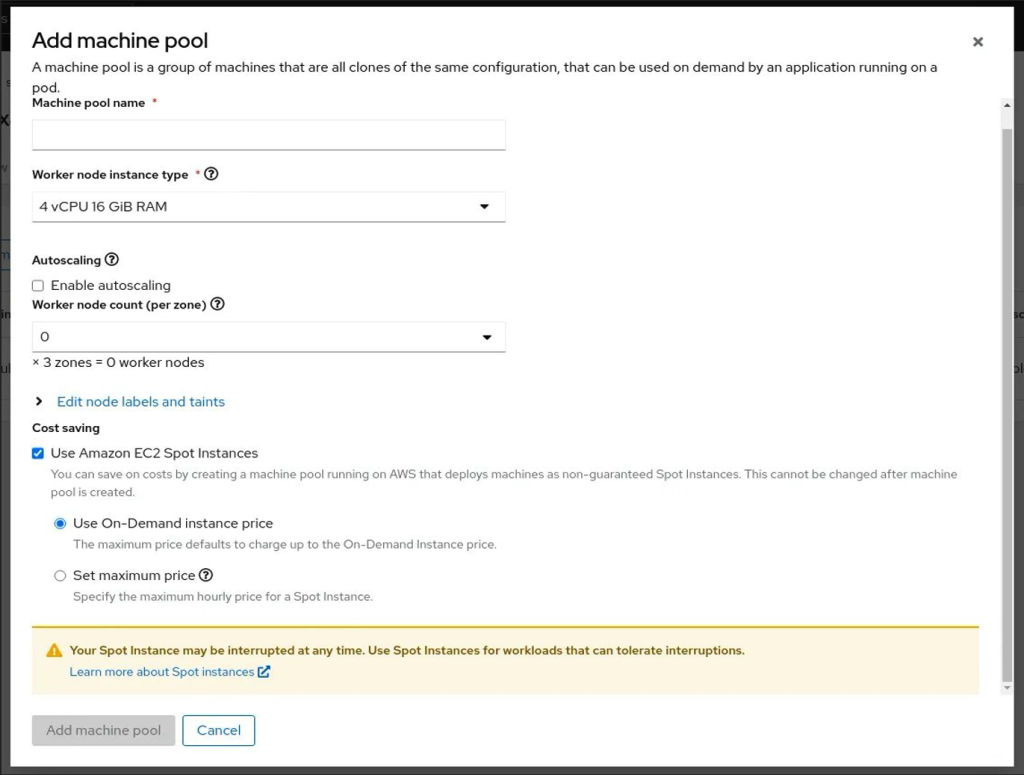
Figure 5: ROSA machine pool configuration screen
EC2 Instance Selection
It’s not just about how you deploy, but what you deploy as well. In order to maximize the value you get for your instances, while minimizing the amount you pay for them, you need to right size. Right sizing involves optimizing the compute resources allocated in your clusters and containers. Each container requires carefully configured requests and limits for CPU and memory usage to ensure optimal performance and cost efficiency.
Resource allocation requires precise configuration to match actual utilization patterns. Setting values too low may result in resource throttling and performance degradation, while setting them too high leads to underutilized resources and unnecessary costs. The difference between actual utilization and requested resources, known as slack cost, represents potential area for cost optimization. This is why an ideal instance matches your requirements as close as possible.
Fortunately, Amazon EC2 offers more than 850 instance types across six specialized families: general purpose, compute optimized, memory optimized, storage optimized, accelerated computing, and high-performance compute. These instance types provide various combinations of CPU, memory, storage, and networking capacity, with sizes ranging from extra small to 4XL. This extensive selection enables precise resource allocation matching your workload requirements and scaling needs.
To simplify the instance selection process and optimize resource utilization, AWS offers a suite of specialized tools. The Amazon EC2 Instance Type Explorer (Figure 6) allows customers to efficiently browse instance options using filters based on hardware configurations. These filters include processor types (Intel, AMD, AWS Graviton), accelerators (NVIDIA, Qualcomm), and specialized capabilities such as bare metal hosting and workload optimization features.
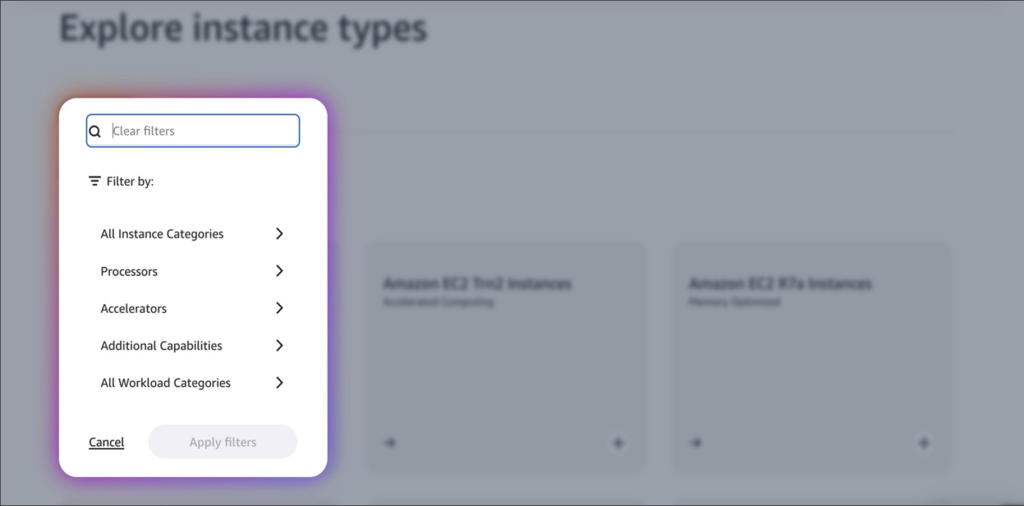
Figure 6: Amazon EC2 Instance Type Explorer
For more granular control, the Amazon EC2 Instance Type Finder page in the AWS Management Console (Figure 7) provides an advanced instance selection tool. This interface enables users to choose from various workload types, including web and application servers, machine learning applications, and specialized database services. It also allows for refinement through specific use case selections, optimization priorities (cost efficiency, performance, or a balanced approach), and filtering by hardware manufacturers and configurations.
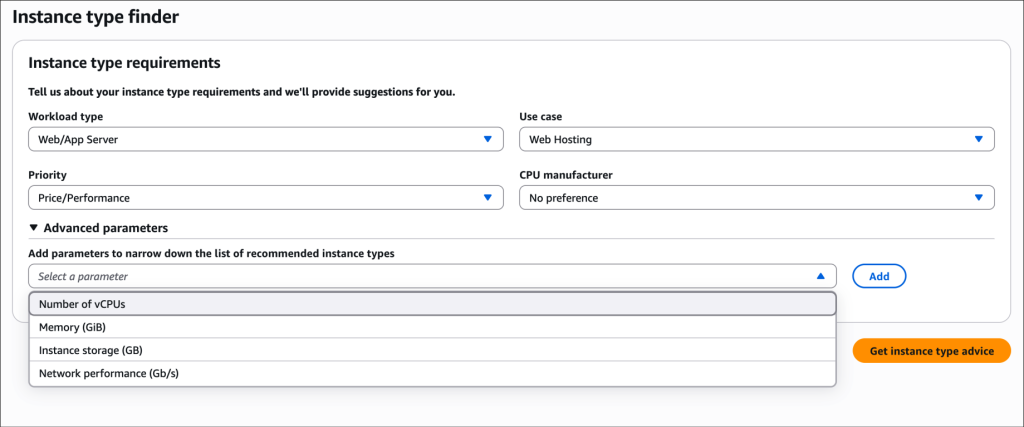
Figure 7: Amazon EC2 Instance Type Finder
In your search for the perfect instance type, you may find another category of instance called AWS Graviton, an ARM-based processor family designed to deliver the best price performance for EC2 workloads. With Graviton, you can achieve on average up to 45 percent savings, and receive unparalleled performance. For example, R8g instances, our latest memory-optimized graviton instance built on the Graviton4 chip, delivers better price performance than any other existing memory-optimized instance.
Each generation of AWS Graviton processors demonstrates substantial performance enhancements. AWS Graviton4 offers up to 30% better compute performance compared to AWS Graviton3. AWS Graviton3, in turn, achieved up to 60% better efficiency and up to 40% better performance over comparable instances. This follows the trend set by AWS Graviton2, which provided up to 40% improvement over its predecessors. To illustrate these efficiency gains, consider comparing an Amazon EC2 M6i instance (powered by 3rd generation Intel Xeon Scalable processors) with an Amazon EC2 M7g instance (powered by AWS Graviton3 processors), both offering 4 vCPUs and 16 GiB of memory (Figure 8).
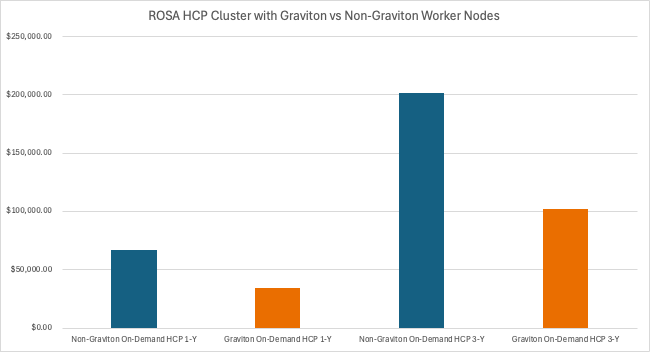
Figure 8: ROSA HCP Cluster performance with Graviton and non-Graviton worker nodes
Analysis of both 1-year and 3-year commitment scenarios indicates that deploying ROSA on AWS Graviton-based instances can potentially reduce costs by up to 50% compared to equivalent x86-based instances, if your architecture allows. Graviton instances come in all types and sizes, so be sure to check out if they’re a good fit for your workload.
However, the rightsizing and cost optimization journey doesn’t end after you’ve chosen a good instance. Over time, workloads evolve and deployment strategies change, which can lead to new optimization opportunities. AWS Compute Optimizer (Figure 9) offers native capabilities to provide rightsizing recommendations based on historical usage patterns. With this feature enabled, AWS identifies idle instances and allows users to take action to terminate or right size underutilized resources. Recommendations are typically generated within 24 hours of idle instance identification.
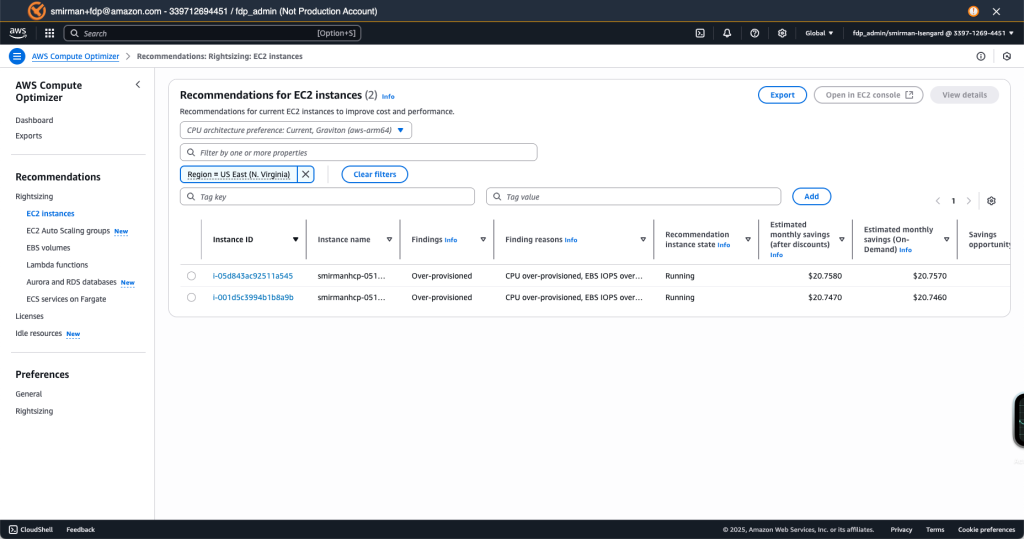
Figure 9: AWS Compute Optimizer
The console will show which instances have been detected as inefficient for being either over-provisioned or under-provisioned. It will give you information such as the instance ID, who the instance belongs to, current state, and most importantly, the opportunity value for savings. You can click on any reporting instance to dive deeper into the recommendations (Figure 10).
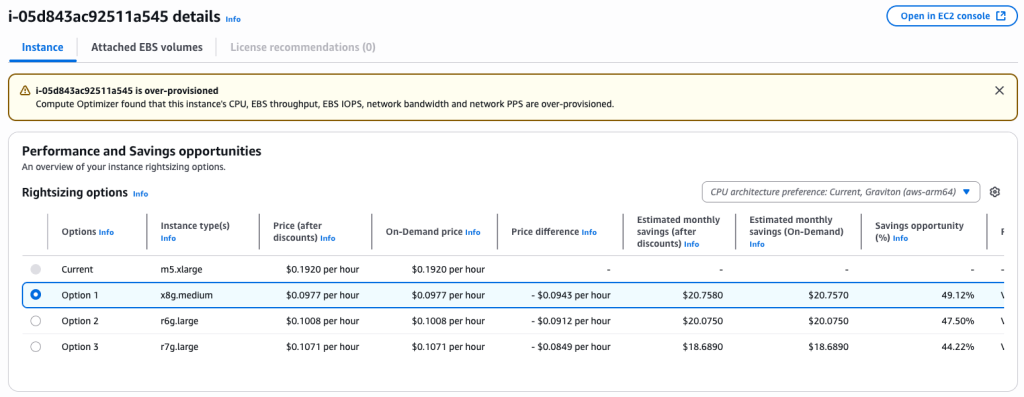
Figure 10: AWS Compute Optimizer Performance and Savings opportunities dashboard
AWS Compute Optimizer provides automated instance optimization recommendations by analyzing resource utilization patterns. The service identifies alternative Amazon EC2 instances that can meet workload requirements more efficiently than currently deployed instances. These recommendations include detailed cost comparisons, showing potential savings both as absolute dollar amounts and as percentages of current spending. In the above example (Figure 10), the recommendations suggest alternative instances that could reduce costs by 44% to 50% while maintaining required performance levels. The following example (Figure 11) shows how the current instance expenditure and recommended alternative(s) are visualized graphically.
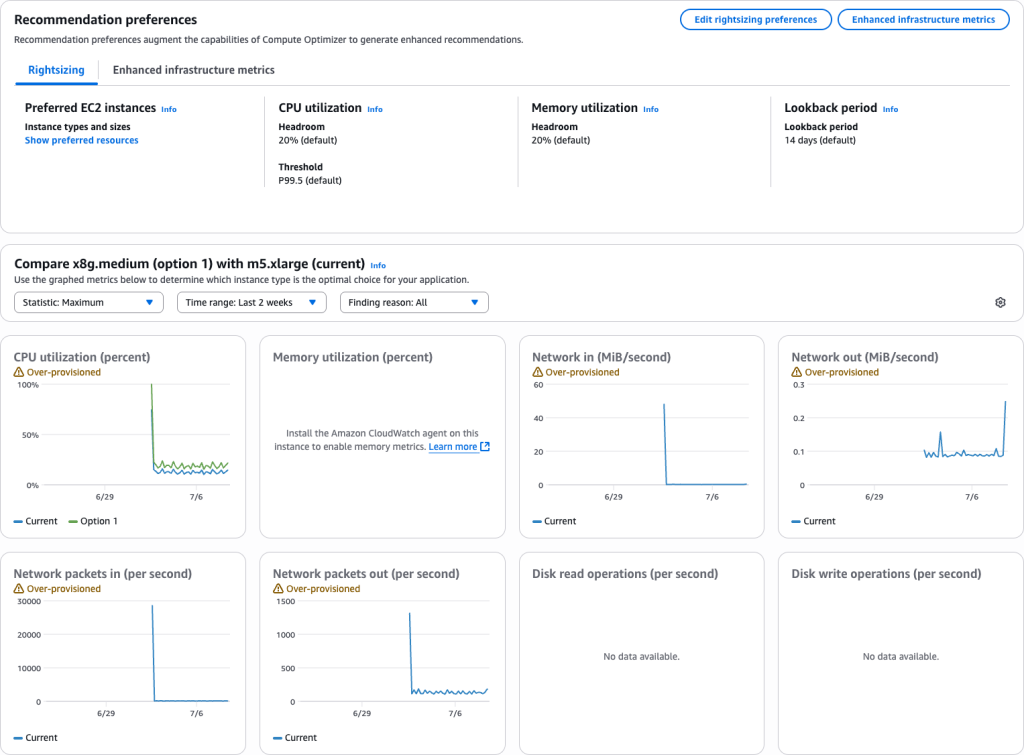
Figure 11: AWS Compute Optimizer Recommendation Preferences
For more information on the AWS Compute Optimizer’s usage, fine tuning, and visualization capabilities, check out the AWS product page found here.
Summary
So, to recap, we covered the procurement models for both ROSA licensing and the EC2 instances that make up your worker nodes, including ROSA Classic vs HCP and the difference between on-demand, reserved, and spot EC2 instances. We also showed the various EC2 Savings Plans and gave tangible examples of how these discounts are applied to ROSA Clusters. Lastly, we went over the guiding principles of EC2 instance selection and rightsizing, including the various types of instances and the provided tooling you can use to find the best configuration for your workloads.
Now that we’ve established the foundation, stay tuned for part 2 to this blog where we’ll be going over more hands-on cost savings best practices including: resource requests & limits, autoscaling, load balancing, and persistent storage optimization; as well as cost monitoring & observability tools from both AWS & Red Hat’s respective consoles.
Additional Resources:
- To request a Migration Evaluation or initiate conversation: Customers can contact their AWS account representative or email aws-redhat-partnerteam@amazon.com.