AWS Marketplace
Enhancing multicloud networking with AWS Direct Connect and Equinix
Recently, Equinix introduced the Equinix Fabric Cloud Router (FCR), a virtual routing service that enhances multicloud networking while improving performance, security and cost-efficiency. Equinix FCR with AWS Direct Connect is available in AWS Marketplace, allowing organizations to establish private, dedicated connections across their cloud infrastructure. By procuring Equinix FCR in AWS Marketplace, organizations benefit from streamlined procurement processes, consolidated billing with their existing Amazon Web Services (AWS) account, and seamless integration that reduces deployment complexity while enabling faster time-to-value for multicloud connectivity solutions.
According to a TechTarget Enterprise Strategy Group survey, 94% of organizations work with multiple cloud providers—some choosing different providers for specific capabilities, while others make these choices based on merger and acquisition considerations. For organizations building their workloads across different cloud environments, secure, reliable connectivity is a major benefit. Equinix FCR, working with Direct Connect, is designed to provide low-latency connectivity between AWS and other cloud infrastructure at various speeds in a reliable manner. This post explains how FCR enables cloud connectivity, examines key benefits and use cases, and helps you to get started with deploying this solution.
Key benefits: Rapid multicloud connectivity at scale
FCR using Direct Connect in AWS Marketplace provides:
- Third-party quick network deployment – Deploy private connectivity between clouds in under an hour without colocation, hardware, or licensing
- Proximity and connectivity – Access enterprise-grade service-level agreements (SLAs) and support for interconnections
- Security and reliability – Direct routing over a private network with built-in resiliency
- Flexible multicloud connectivity – Scale from 200 Mbps to 25 Gbps with pay-as-you-go options
- Unlimited connections – Create unlimited connections per cloud router
FCR provides Layer 3 connectivity at configurable speeds when merging systems across different clouds. This helps in scenarios involving mergers and acquisitions. Using Direct Connect, FCR deploys without hardware management overhead. For applications that need to access data in different clouds, FCR provides consistent performance and low-latency private connectivity across cloud providers. The service reduces data transfer costs while simplifying infrastructure management. When working with artificial intelligence and machine learning (AI/ML) models across clouds, FCR enables high-performance data transfer through Equinix’s private network. This helps optimize costs while maintaining training schedules. For petabyte-scale migrations between clouds, Equinix FCR provides secure private connectivity through AWS Marketplace deployment. The service works with AWS DataSync to reduce transfer costs through compression and optimized data movement, benefiting from the lower data egress charges offered by Direct Connect.
Prerequisites
To set up and provision a new Fabric Cloud Router, you need to have the following prerequisites:
- An AWS account
- An Equinix account
Solution walkthrough: Enhancing multicloud networking connectivity with AWS Direct Connect and Equinix
This section walks through the steps to sign up for an AWS account, an Equinix free trial in AWS Marketplace, and to set up and provision a new Fabric Cloud Router through the Equinix Customer Portal.
You can sign up for a public AWS Marketplace Free Trial, which allows you to try out a Fabric Cloud Router at the Standard service tier level at no cost during the 7-day trial period. You can provision up to 2 x 200 Mbps Fabric Virtual Circuits (VCs).
- Sign in to AWS Marketplace. To create an AWS account, visit Start building on AWS today and choose Create an AWS Account.
- Enter Equinix in the AWS Marketplace search field or go to Equinix Fabric Cloud Router with AWS Direct Connect.
- In the list of search results, choose Fabric Cloud Router (Free Trial).
- Choose Try for free as shown in the following figure.
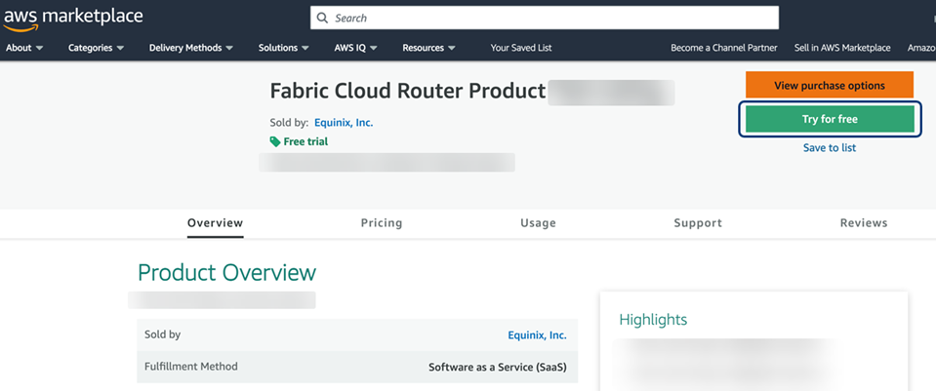
Figure 1: Try for free in AWS Marketplace
In the Offer type window, choose Subscribe to free trial as shown in the following figure.
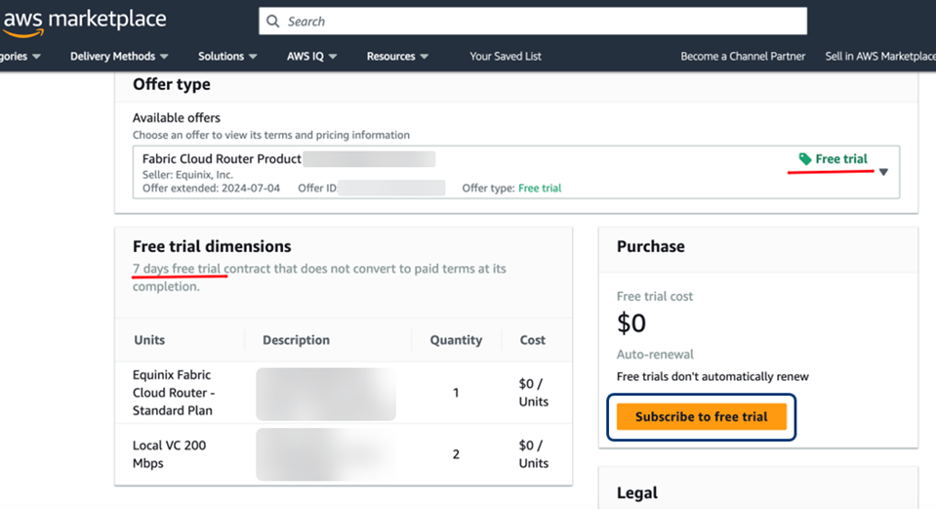
Figure 2: Subscribe to free trial
After subscribing, complete the following to set up your account:
- In the success window, choose Set up your account. In the registration form, enter your company, name, email address, and other information. Choose Complete Registration.
- You will receive two emails within 10–15 minutes after your registration is complete that will include
- A welcome email with your subscription key.
- An email with the link for registering your account.
- Check your junk or spam folder if you don’t receive the emails after 15 minutes.
- In the second email, choose the link to Verify Email Address.
- Set your password and choose Complete Registration to set up your Customer Portal account.
- Using your subscription key from the first email, create and provision a Fabric Cloud Router or new VCs through the Customer Portal.
Creating a Fabric Cloud Router
To create a new Cloud Router, follow the instructions at Creating a Fabric Cloud Router in the Equinix Fabric Cloud Router documentation. After you set up a Fabric Cloud Router, you can view and manage its connections as described in the Fabric Cloud Router documentation.
To create a Fabric Cloud Router connection, use the subscription keys from your welcome email.
Creating a Fabric Cloud Router connection using a subscription key
The following steps show you how to establish connectivity between Direct Connect and your Fabric Cloud Router using a subscription key. Using a cloud router connection, you can connect to AWS services through a private network connection.
- Sign in to the Equinix Customer Portal and navigate to Fabric.
- On the Connections tab, choose Create Connection, as shown in the following figure.
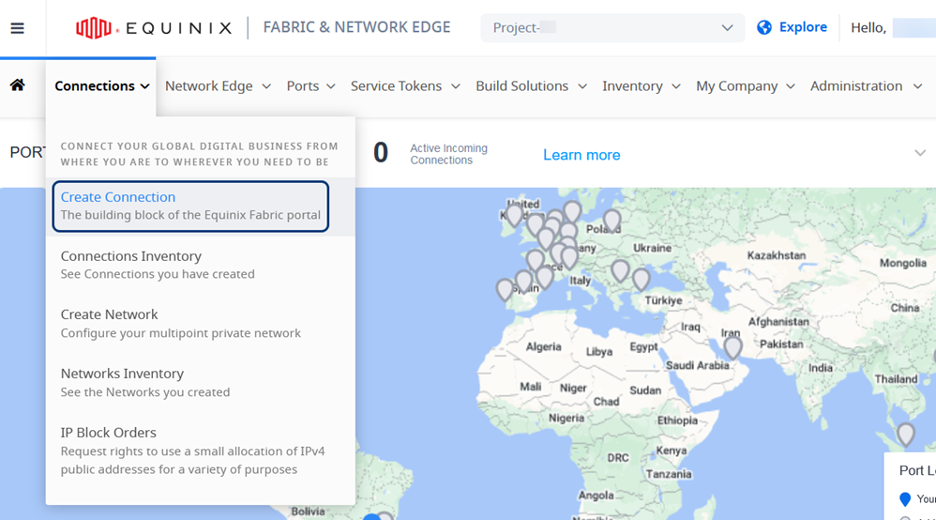
Figure 3: Create a Fabric connection
3. On the A Service Provider card, choose Connect to a Service Provider and search for Amazon Web Services.
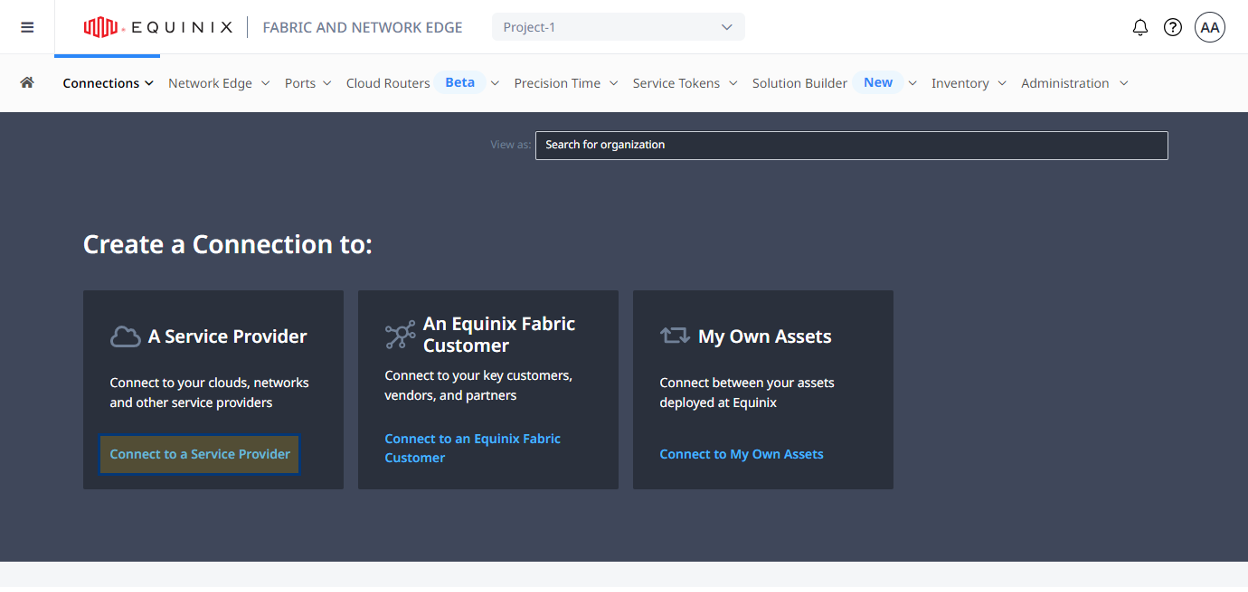
Figure 4: Link the connection to AWS
4. On the AWS Amazon Web Services card, choose Select Service, then choose Create Connection.
5. In Enter Your AWS Information, choose a connection type as shown in the following figure:
- Redundant – Create a redundant pair of connections. If you’re using the free trial, don’t set up redundant connections because this will use both Virtual Circuits you have access to on the connection to one cloud. For production networks, redundant links are recommended.
- Primary – Create a single, primary connection.
- Secondary – Create a single, secondary connection.
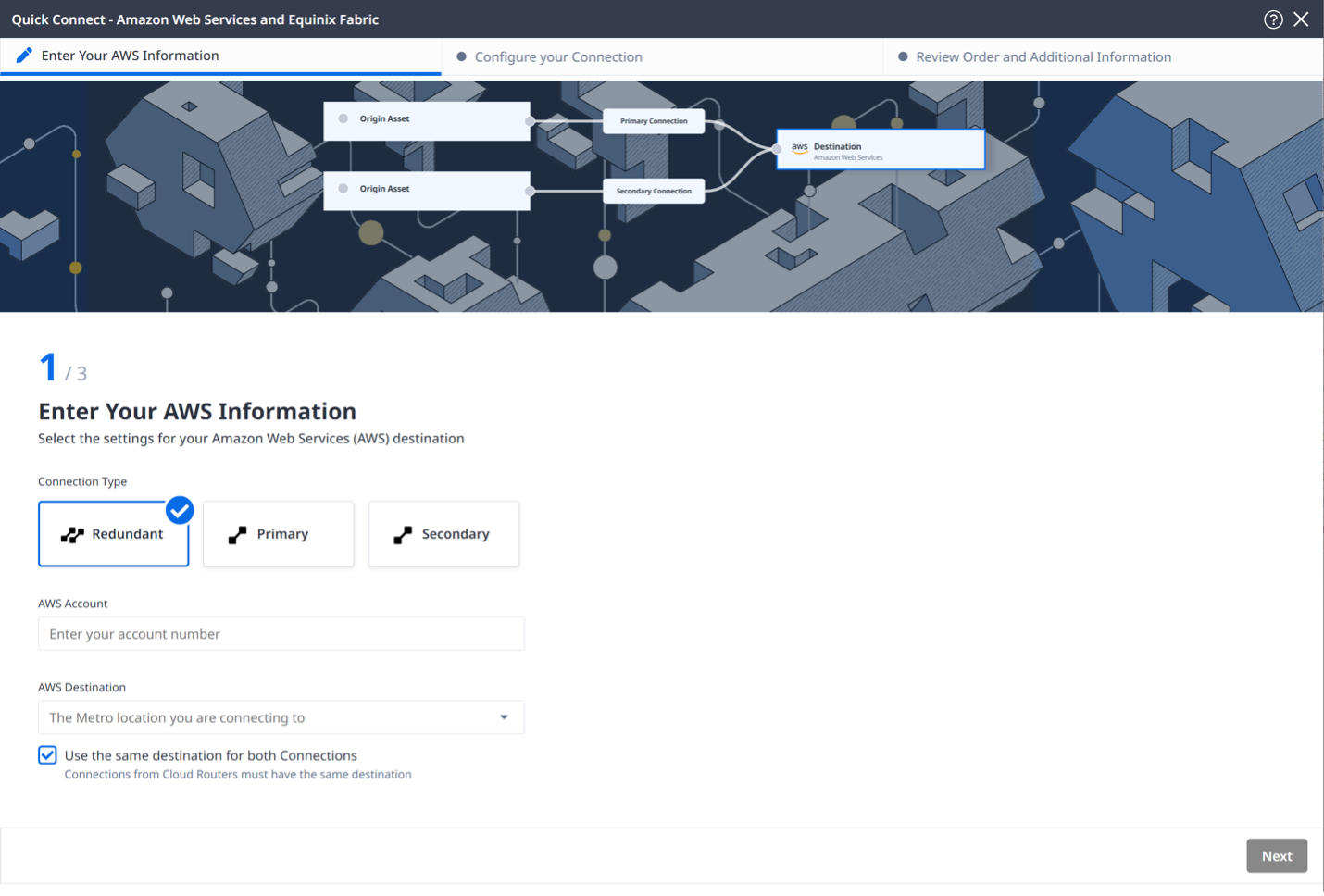
Figure 5: Enter your AWS information and choose a Connection Type
6. Enter your AWS Account ID and choose Next.
7. To retrieve your AWS account identifier, sign in to the AWS Management Console and choose your username in the top right corner. When you copy your account ID into the field, make sure to remove the hyphens, as shown in the following figure.
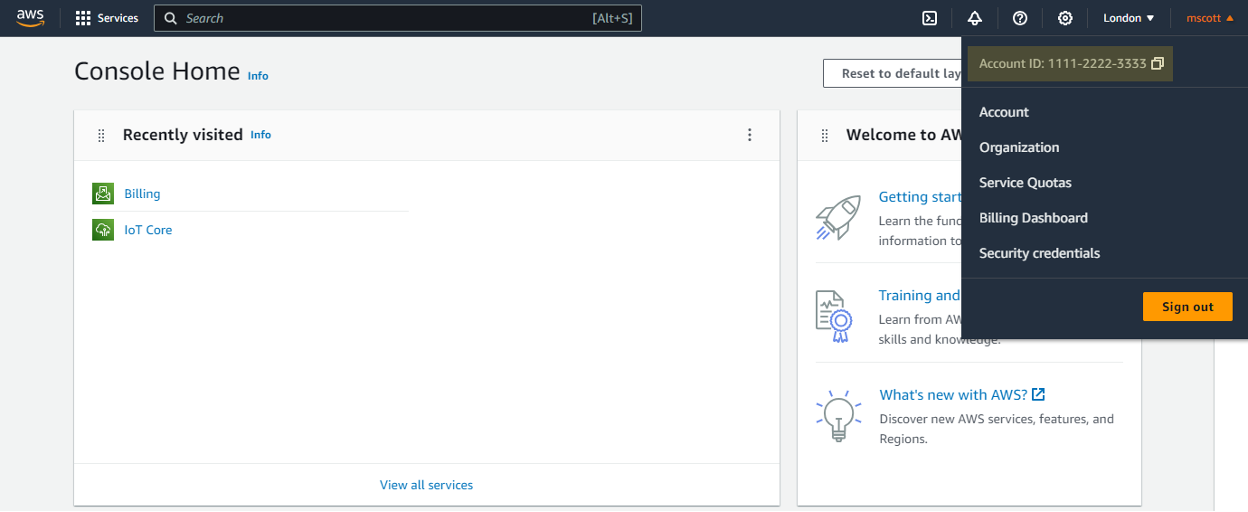
Figure 6. AWS console to fetch account
From the AWS Destination dropdown list, choose your metro. Make sure to use the same destination for both Connections selected and choose Next.
- In Configure Your Connection on the Origin Asset Type drop-down list, choose Cloud Router.
- Choose +Select Cloud Router. In the form that displays on the right, choose a cloud router instance and choose Select Cloud Router.
- In the Primary Connection section
- Enter the primary Connection Name. The name must contain 3–24 characters.
- Choose a Bandwidth from the dropdown list. The bandwidth value that you choose also applies to the secondary connection.
- In the Secondary Connection section, enter your secondary Connection Name, and choose Next.
- In Review Order and Additional Information, review your connections. To view a summary of your order details, choose Show Order Summary in the lower right. To download a PDF summary, choose Download Order Summary as shown in Figure 7.
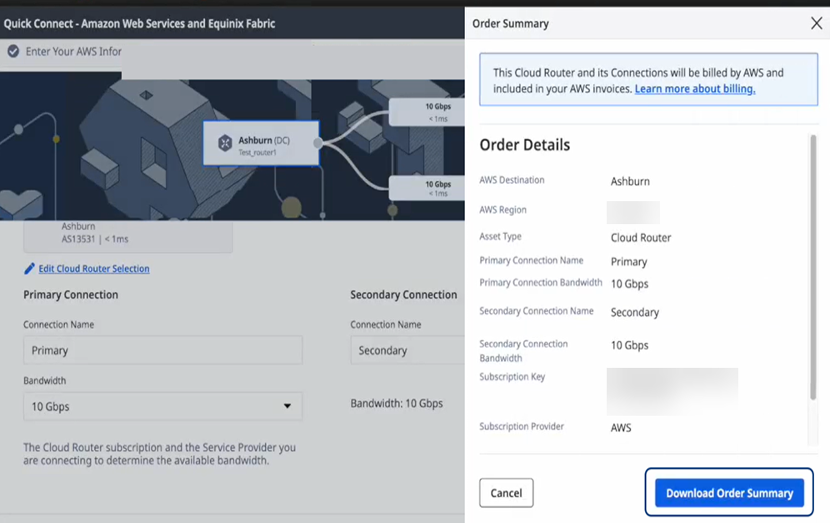
Figure 7: Connection review page
After completing these steps, the configuration establishes a Fabric Cloud Router instance with Direct Connect connectivity. The configuration provides private, dedicated connections that support flexible bandwidth options based on the selected tier. Monitor and manage your connections through the Equinix Customer Portal.
Cleanup
- If you don’t plan to go ahead with the free trial for your AWS Marketplace subscription, please go to the Manage subscriptions page, choose Manage next to the software subscription and cancel the subscription.
- You can learn more about cancelling a free trial here.
- Similarly, on the Equinix console, please ensure you cleanup and delete any resources that were created as part of this getting started guide if you don’t plan to use them.
Conclusion
Equinix Fabric Cloud Router, a third-party solution available in AWS Marketplace with AWS Direct Connect, provides a streamlined approach to multicloud networking. In AWS Marketplace, organizations can establish secure, private connections between cloud environments without managing physical infrastructure. The service supports various use cases—from post-merger system integration to large-scale data migration—while helping optimize performance and costs. To explore how FCR can support your cloud connectivity requirements, try the 7-day trial in AWS Marketplace.
Learn more about Equinix FCR with Direct Connect.