AWS Marketplace
Enhance retail operations using Concierto Insights & Agentic AI Platform with AWS
Retail enterprises are under increasing pressure to drive intelligent decisions, personalize experiences, and operate efficiently while managing fragmented data across ecommerce, Point of Sale (POS), warehouse, and supplier systems. Unifying and governing this data facilitates advanced analytics, AI adoption, and agile execution.
In this post, we describe how the Concierto Insights & Agentic AI Platform, a third-party solution available in AWS Marketplace, helps retail and consumer goods organizations build high-quality, governed data products on AWS through domain-driven modeling and built-in quality controls. Organizations can use Concierto Insights to standardize data management processes and support their forecasting, planning, and innovation initiatives.
This post demonstrates how to subscribe to the Concierto Insights & Agentic AI in AWS Marketplace and provides step-by-step guidance on how to use AWS Marketplace streamlined procurement processes to deploy a solution that helps teams design, publish, and consume trusted data products, standardizing data pipelines and powering enterprise-wide AI and decision-making.
Retail persistent data challenges
Retailers often face the following data challenges:
- Retail search – Inadequate tagging reduces product discovery, driving search abandonment and revenue loss
- Inventory visibility – System gaps create stockouts, diverting customers to competitors
- Product planning – Data fragmentation impairs mix decisions, impacting revenue
- Fulfilment and returns – Data inconsistencies delay shipping and complicates return processing
- Supplier performance – Limited integration causes inventory and quality challenges
- Demand forecasting – Disconnected data creates inventory imbalances and margin loss
Solution overview
Concierto Insights by Trianz is a modern analytics platform on AWS that transforms fragmented retail data into business-ready data products without coding.oncierto’s federation engine queries data across multiple data sources in real time and leverages its Data Build Tool (dbt) based transformation engine to enrich data at the source instead of relying on ETL.
Concierto Insights addresses critical retail challenges by enabling real-time inventory visibility, unifying planning data for better product mix decisions, streamlining fulfilment, integrating supplier performance, and supporting accurate demand forecasting.
Concierto’s approach consists of the following key tenets:
- Federation over migration – Connect to diverse data sources without relocating data
- Semantic modeling – Define a common business language across data silos
- Data quality and governance – Enforce accuracy and compliance upfront
- Self-service data marketplace – Allow stakeholders to search, access, and act on data directly
- AI and BI assistant – Deliver insights conversationally with Concierto’s Conversa and Live Intel
The following diagram illustrates Concierto Insights’ high-level architecture.
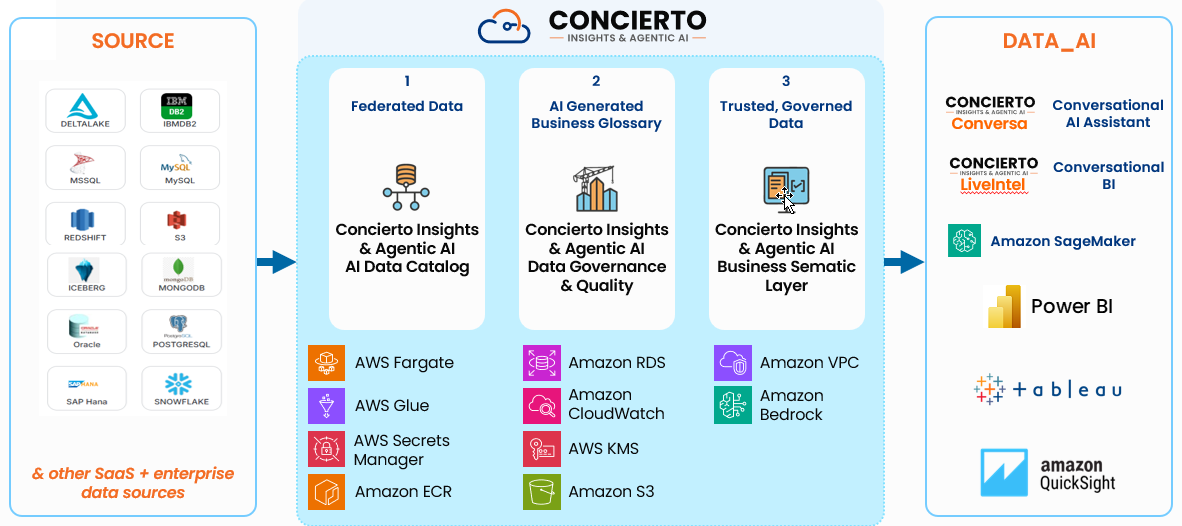
Figure 1: Concierto Insights high-level architecture
In this post, we set up Concierto Insights using Amazon Elastic Container Service (ECS), Amazon Relational Database Service (Amazon RDS), AWS Network Firewall, Amazon Simple Storage Service (Amazon S3), and supporting network components. The following diagram depicts the overall solution architecture.
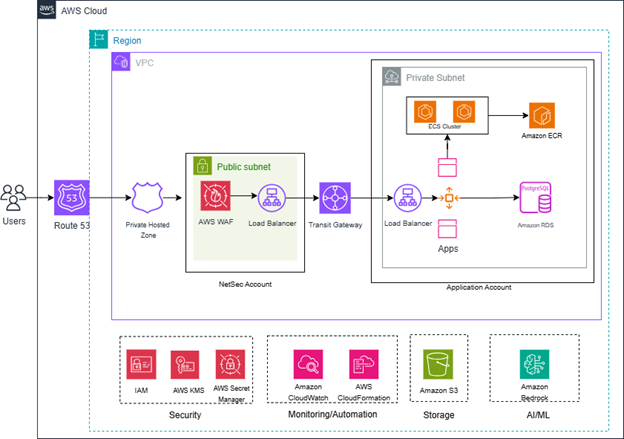
Figure 2: Concierto Insights deployment architecture
The Concierto Insights solution consists of the following key components:
- DNS and load balancing – A private hosted zone resolves DNS for internal and external load balancers and Amazon RDS, with traffic flowing from the Application Load Balancer (ALB) to the Network Load Balancer (NLB), then to the internal ALB for security.
- Private subnets –The application core runs in a virtual private cloud’s (VPC’s) private subnets, with traffic controlled through security groups and routed through an external ALB to a Multi-AZ Amazon ECS Fargate cluster.
- Internal service communications – Internal ECS services communicate securely through an internal ALB, providing service-to-service interaction within the private network.
- Data persistence and encryption – Amazon RDS for PostgreSQL provides highly available, Multi-AZ data persistence, with AWS Key Management Service (AWS KMS) encryption securing data at rest.
- Monitoring and security – Application logs and metrics are stored in Amazon CloudWatch, integrated with Amazon Simple Notification Service (Amazon SNS) for alerts. ALBs are protected by AWS WAF, and TLS provides secure internal and external communication.
Prerequisites
To implement this solution, you must have the following prerequisites:
- Active AWS account
- AWS Identity and Access Management (IAM) role with administrative permissions
Launch Concierto Insights & Agentic AI Platform in AWS Marketplace
Complete the following steps to launch the Concierto Insights & Agentic AI Platform:
- Go to the Concierto Insights & Agentic AI Platform in AWS Marketplace.
- Choose View purchase options. The Subscribe to Concierto Insights & Agentic AI screen is displayed.
- Choose Subscribe. Once complete the Launch Concierto Insights & Agentic AI screen is displayed.
- From the Launch Concierto-Enterprise Agentic AI screen, refer to the downloadable deployment guide PDF in the Follow the vendor’s instructions
- In the Deployment template section, choose the CFT_Path link to download the AWS CloudFormation
- Navigate to AWS CloudFormation console.
- Create a new stack by uploading the template file (yaml).
- Specify stack details.
- Configure stack options.
- Review and create the stack. CloudFormation automatically executes the stack.
After the CloudFormation stack is complete, you will receive a follow-up email. This email will inform the user that their CloudFormation stack has been provisioned and will provide essential details such as the username, password, and the application URL to access their environment.
Log in to Concierto
Complete the following steps to log into Concierto Insights:
- Visit the URL received in the email after you deployed the CloudFormation stack.
- Log in using the username and password provided in the email.
Create unstructured data source
Complete the following steps to create an unstructured data source:
- Choose Configure in the navigation pane and choose Data Sources.
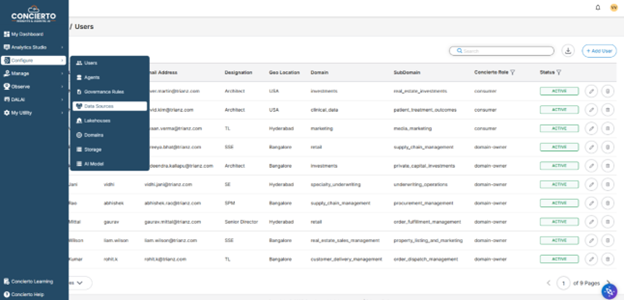
Figure 3: Unstructured data source selection
- Choose Amazon S3 or SharePoint as your data source (for this post, we use Amazon S3).
- Enter a data source name, description, and domain.
- Enter a database name and S3 location.
- Choose On Demand or Scheduled trigger.
The following screenshot shows your new unstructured data source.
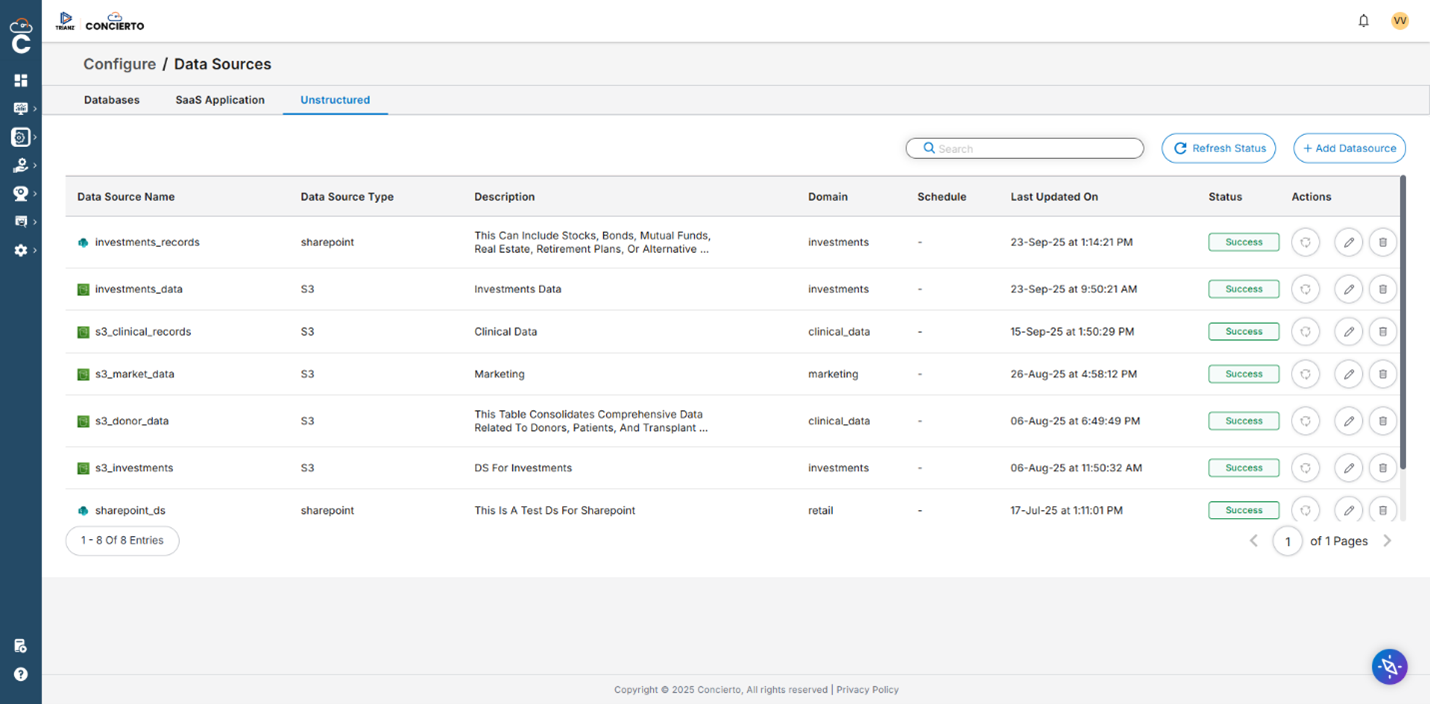
Figure 4: Unstructured data source creation
Create structured data source
Complete the following steps to create a structured data source:
- Choose Configure in the navigation pane and choose Data Sources.
- Choose your database type, such as PostgreSQL, MySQL, or Snowflake
- Enter a data source name, description, and domain.
- Provide connection details, including host, port, database name, schema, user, password, and optional Amazon Resource Name (ARN).
- Choose On Demand or Scheduled trigger.
The following screenshot shows your configured structured data source.
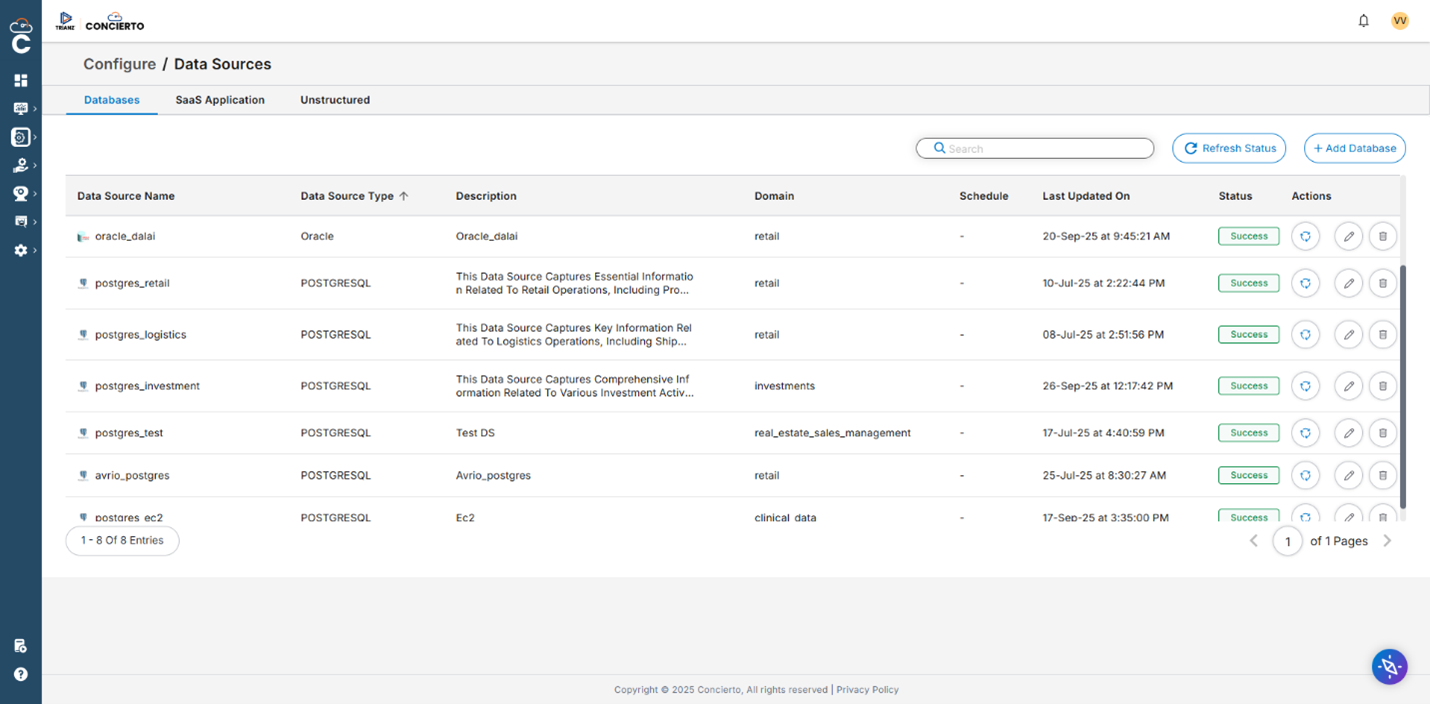
Figure 5: Structured data source creation
Create data product
Complete the following steps to create a data product:
- On the Discovery tab, run a SQL query and choose Publish.
- Review and optionally edit the auto-filled name and description.
- For your columns, assign business names, toggle cache, and Conversa options.
- Review the summary of your settings and choose Submit.
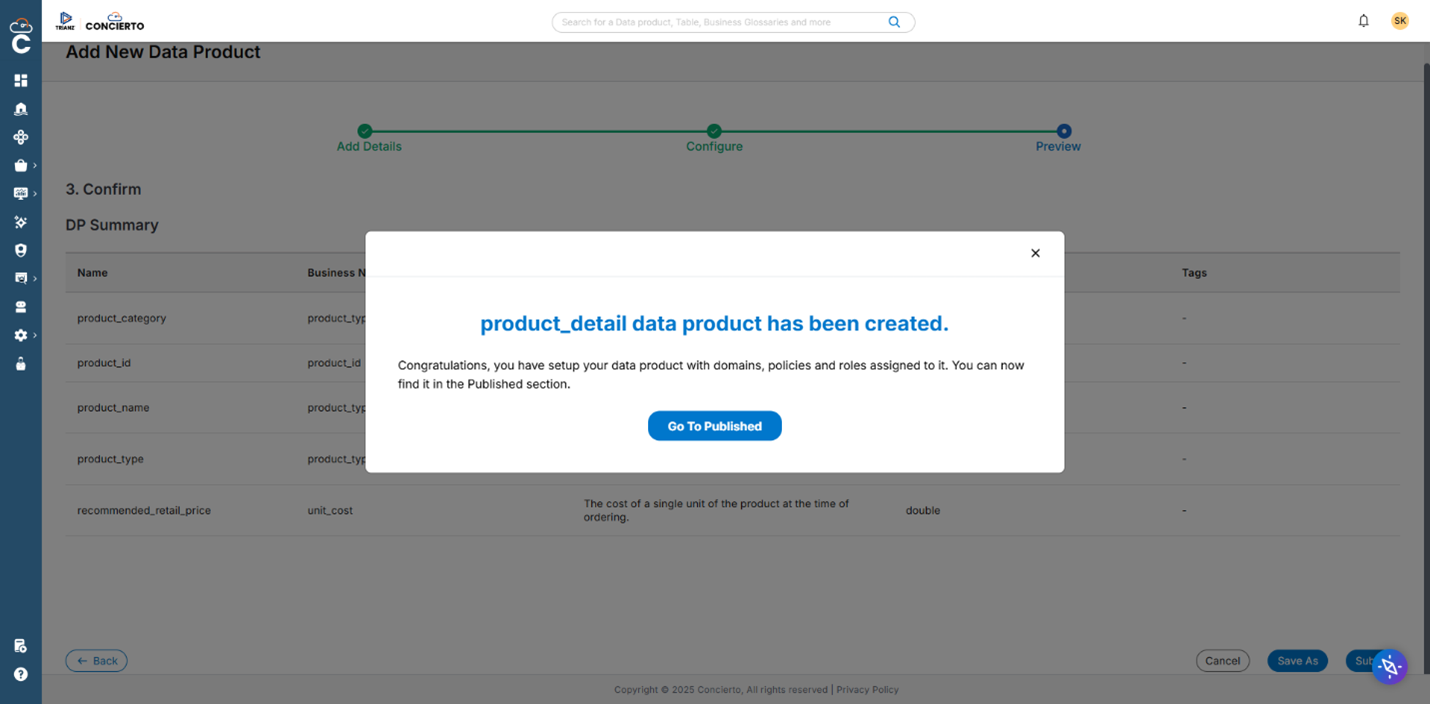
Figure 6: Data product creation
The data product appears on the Published tab with all attributes.
Using the Concierto Insights & Agentic AI Platform
In this section, we explore the features of Concierto Insights and provide some examples of how to use it.
Published tab
The Published tab shows only data products created by the logged-in user.
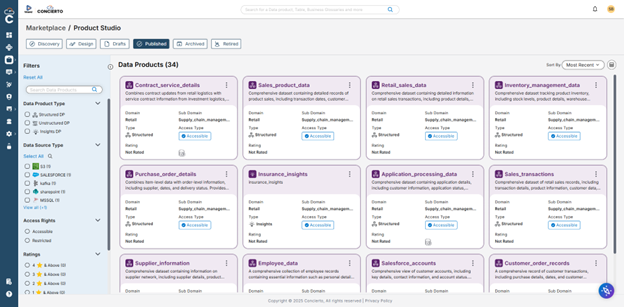
Figure 7: Published data products
Marketplace tab
The Marketplace tab displays all data products across Concierto; they are marked as Accessible or Restricted based on IAM role permissions.
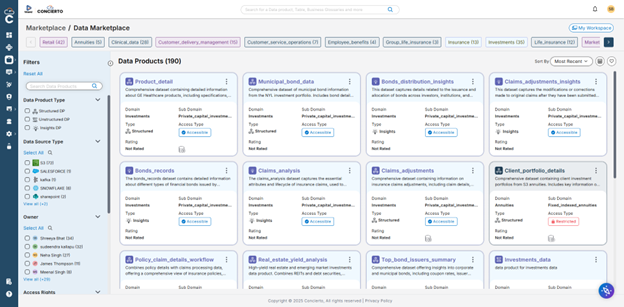
Figure 8: Published Marketplace data products
Concierto Conversa
With Conversa, users can query a data product:
- Choose Load DP and choose the data product to load. The “DP Loaded Successfully” message appears, and the product is now visible in the left pane.
- Pick from query suggestions or enter a custom query.
- Press Enter or choose Go and turn on Ad-hoc mode as needed.
The results appear with a visualization. You can save or publish the results as insights.
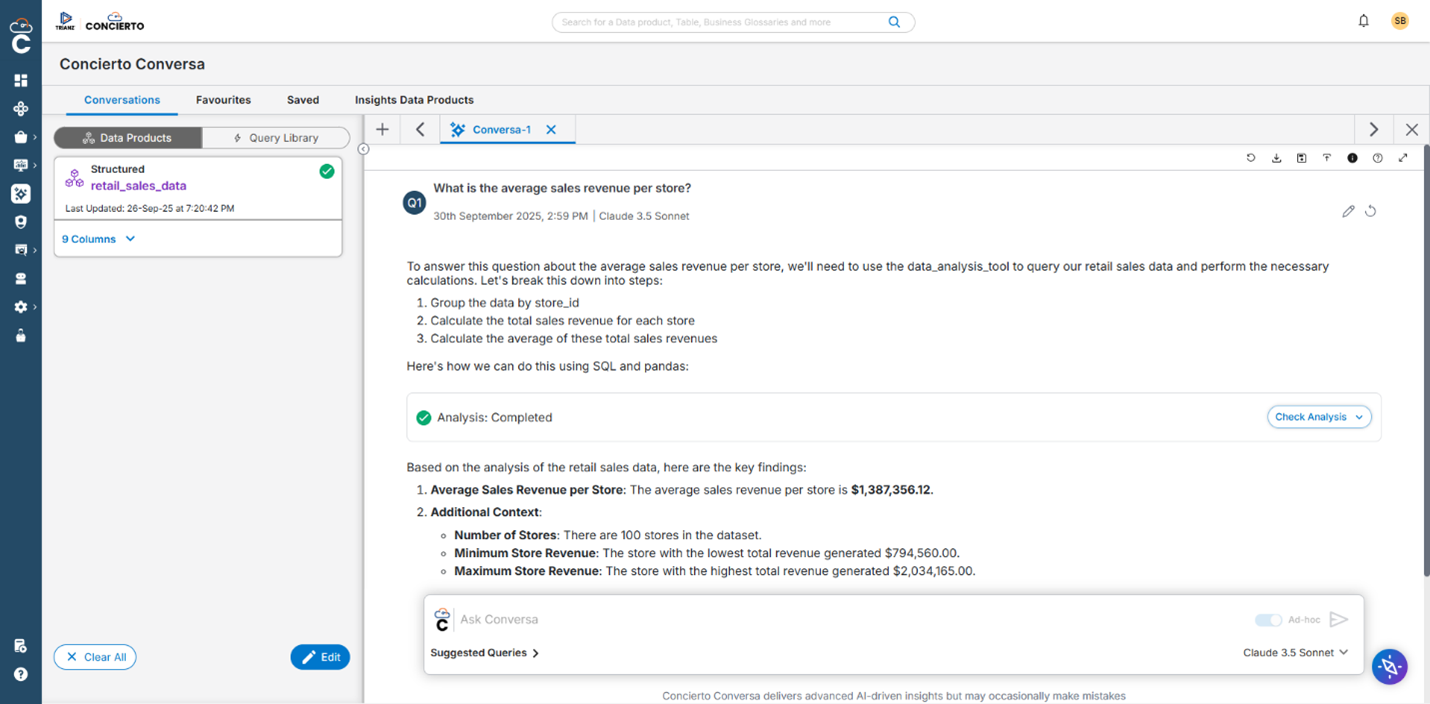
Figure 9: Concierto Insights Conversa
SQL notebook
The SQL notebook feature supports SQL operations like SELECT, INSERT, UPDATE, and DELETE on data products.
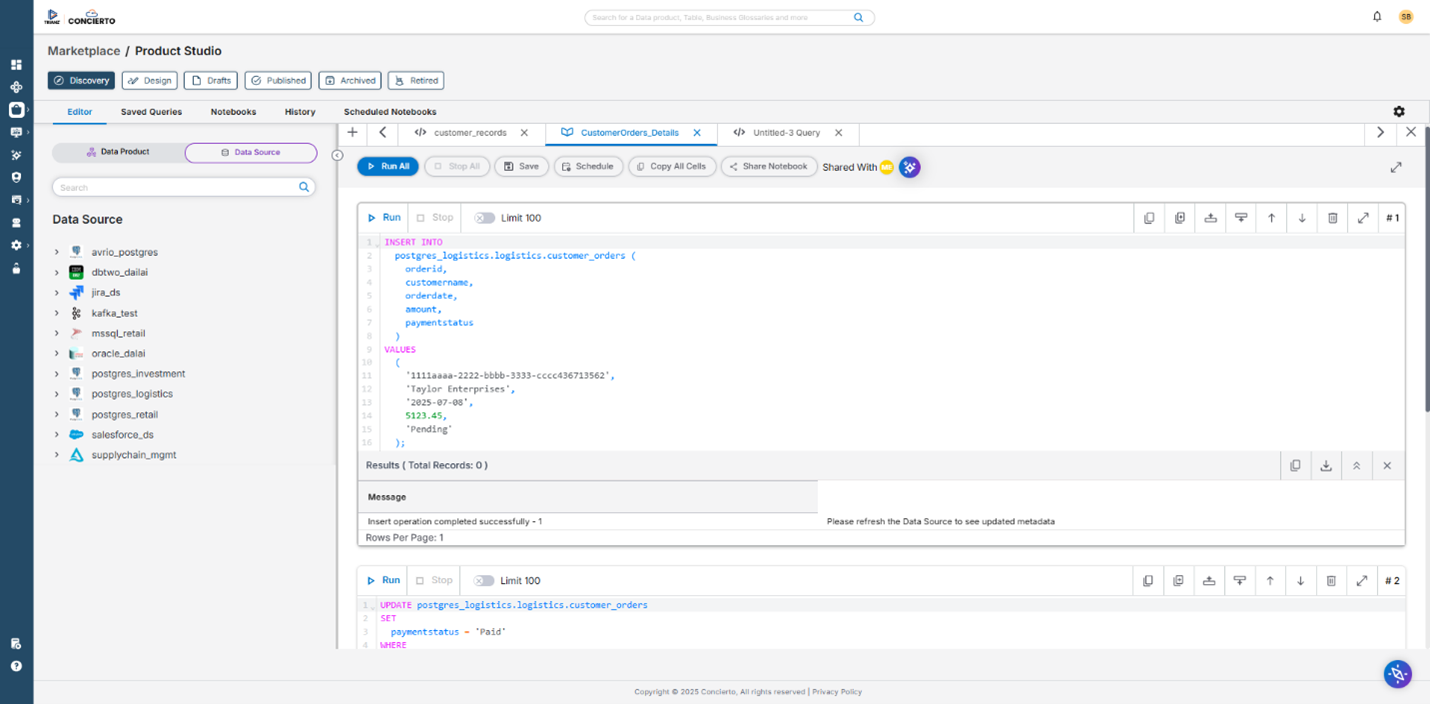
Figure 10: SQL Notebook
Python notebook
Users can use the Python notebook feature to write and execute Python code for data exploration and visualization.

Figure 11: Python Notebook
AI assistant
Users can also generate queries using the AI assistant:
- Choose the AI assistant icon to open the AI Assistant
- Choose your domain, subdomain, and data product.
- Enter a natural language prompt to generate a query.
- Choose Run to run the query.
You can publish the query results as a data product.
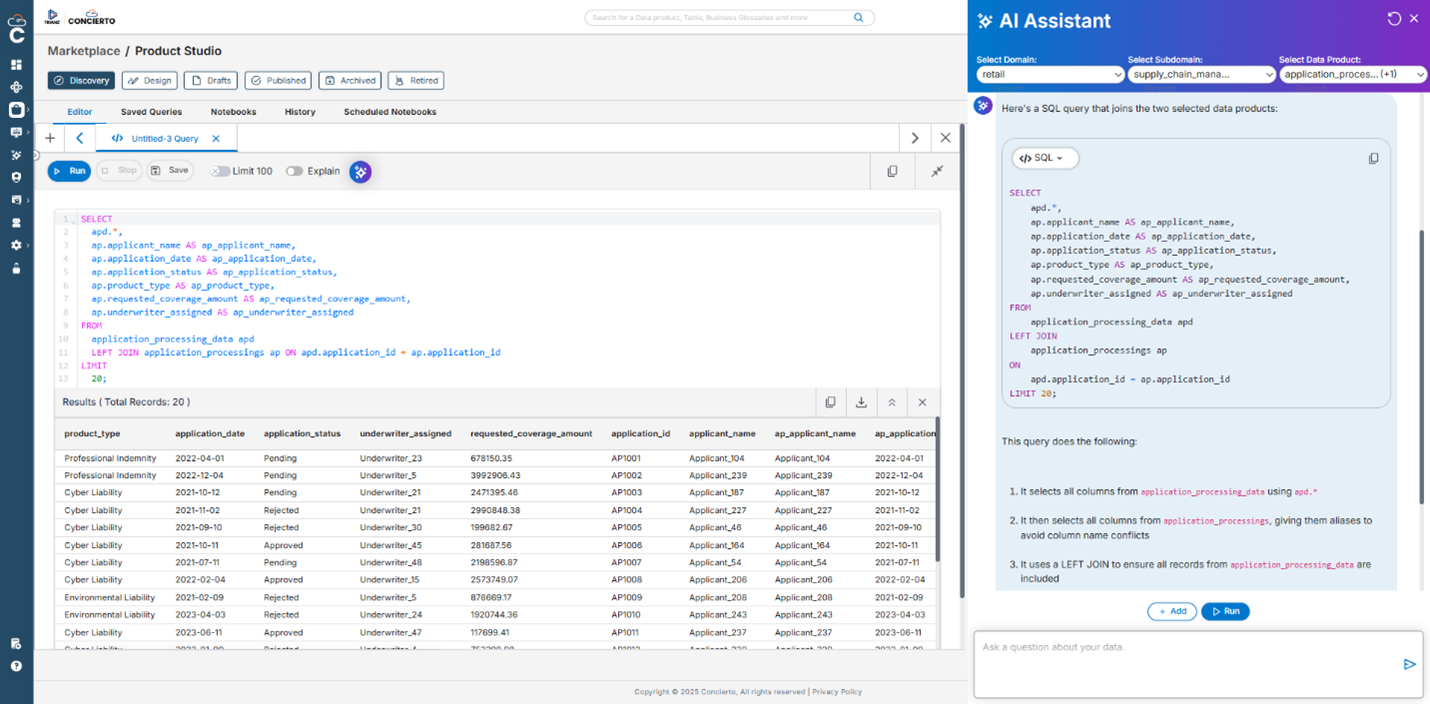
Figure 12: AI Assistant
Live Intel: Charts
With the Live Intel feature, users can choose a data product and configure chart type, axes, filters, and settings, and then save the chart with a name and description.
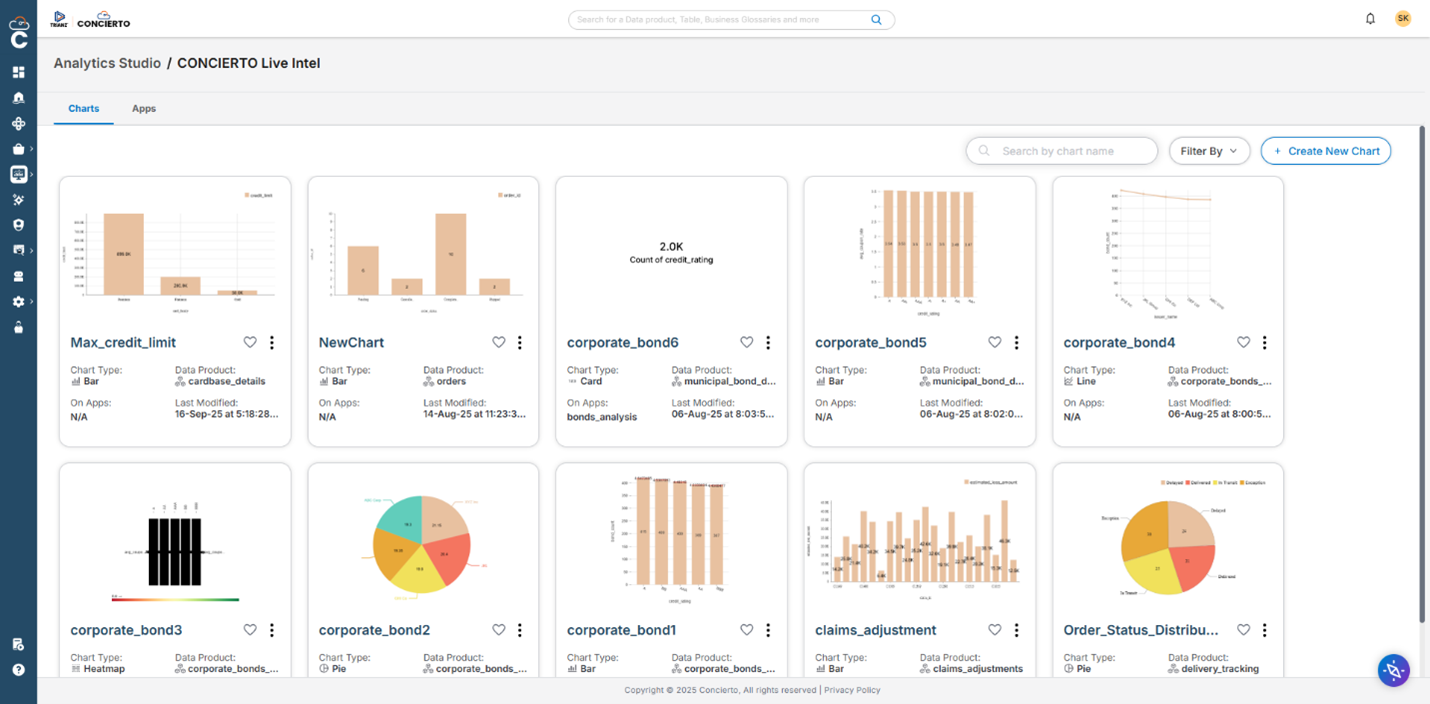
Figure 13: Live Intel – Charts
Live Intel: Applications
The Live Intel feature also provides pre-built applications with multiple charts to monitor and explore key metrics in real time.
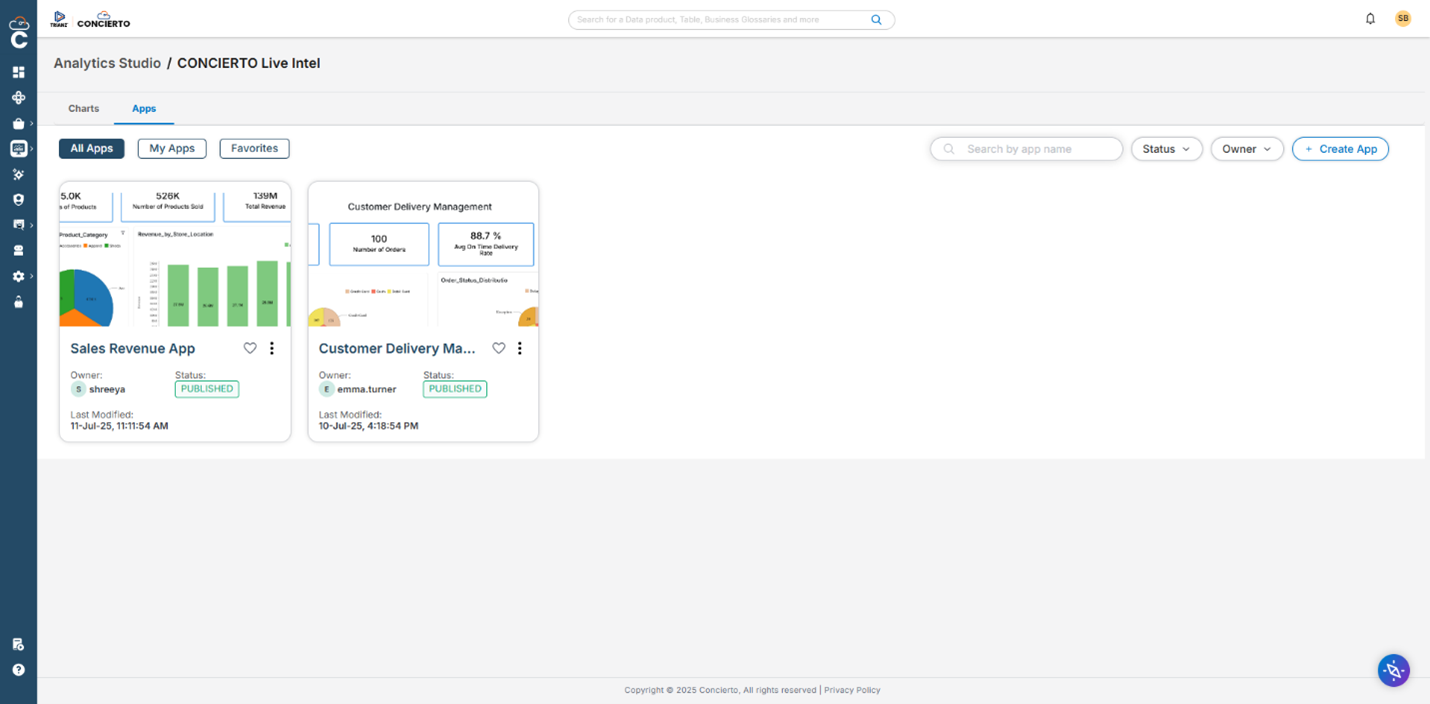
Figure 14: Live Intel – Applications
Conclusion
This post demonstrates how Concierto Insights, available in AWS Marketplace, enhances AWS’s comprehensive data services by creating an integrated, business-user-friendly platform. Concierto Insights amplifies AWS capabilities through enterprise governance, conversational AI, and Agentic orchestration that accelerates business outcomes. Data teams can focus on deriving insights rather than tool orchestration, while business users can naturally interact with federated data without deep technical expertise.
For retail organizations, Concierto Insights streamlines federated data implementation by connecting diverse data sources like POS, inventory, and eCommerce systems through its federation-first approach and semantic modeling layer. The platform helps retailers drive customer-focused decisions across search, inventory, fulfillment, and planning while benefiting from AWS Marketplace’s security, scalability, and cost optimizations.
To find out more, visit Concierto Insights & Agentic AI Platform or request a demo.