AWS Marketplace
Deploy CrowdStrike Falcon Next-Gen SIEM for AWS through AWS Marketplace
CrowdStrike Falcon for AWS in AWS Marketplace is a pay-as-you-go offering AWS customers can use to help protect their cloud workloads using the CrowdStrike Falcon platform and only pay for what they use. The Falcon platform on Amazon Web Services (AWS) is a unified security platform for enterprise-grade security solutions at scale. This offering includes security information event management (SIEM) and cloud security modules, CrowdStrike Falcon Next-Gen SIEM and CrowdStrike Falcon Cloud Security. Falcon Next-Gen SIEM includes a new automation experience that simplifies the onboarding of the complex configurations of AWS Organizations to provide visibility and security monitoring, analysis, detection, and response all within one platform. It does this by using AWS Identity and Access Management (IAM) cross-account read-only asset discovery roles using AWS CloudFormation. In addition to IAM, AWS Marketplace deploys the Falcon Next-Gen SIEM connectors for AWS CloudTrail, Amazon GuardDuty and AWS Security Hub.
In this post, we show you how to use the automation experience in AWS Marketplace to deploy Falcon Next-Gen SIEM for AWS across all AWS Accounts in your AWS Organization. We then demonstrate how to connect AWS CloudTrail, AWS Security Hub, and Amazon GuardDuty.
Solution overview
CrowdStrike and AWS have created an enhanced version of SaaS Quick Launch for Falcon Next-Gen SIEM in AWS Marketplace, delivering a streamlined deployment experience so customers can quickly deploy and access Falcon Next-Gen SIEM for AWS in minutes.
CrowdStrike Falcon Next-Gen SIEM for AWS architecture
Falcon Next-Gen SIEM is a security software-as-a-service (SaaS) hosted on AWS. It uses AWS services running in a customer’s AWS accounts to deploy customer data connectors using Amazon EventBridge, Amazon Simple Notification Service (Amazon SNS), and Amazon Simple Queue Service (Amazon SQS) to send AWS event and security data to Falcon Next-Gen SIEM. The customer’s Falcon Next-Gen SIEM infrastructure is fully managed by CrowdStrike using IAM using cross-account roles and AWS CloudFormation.
The following diagram shows the solution architecture.
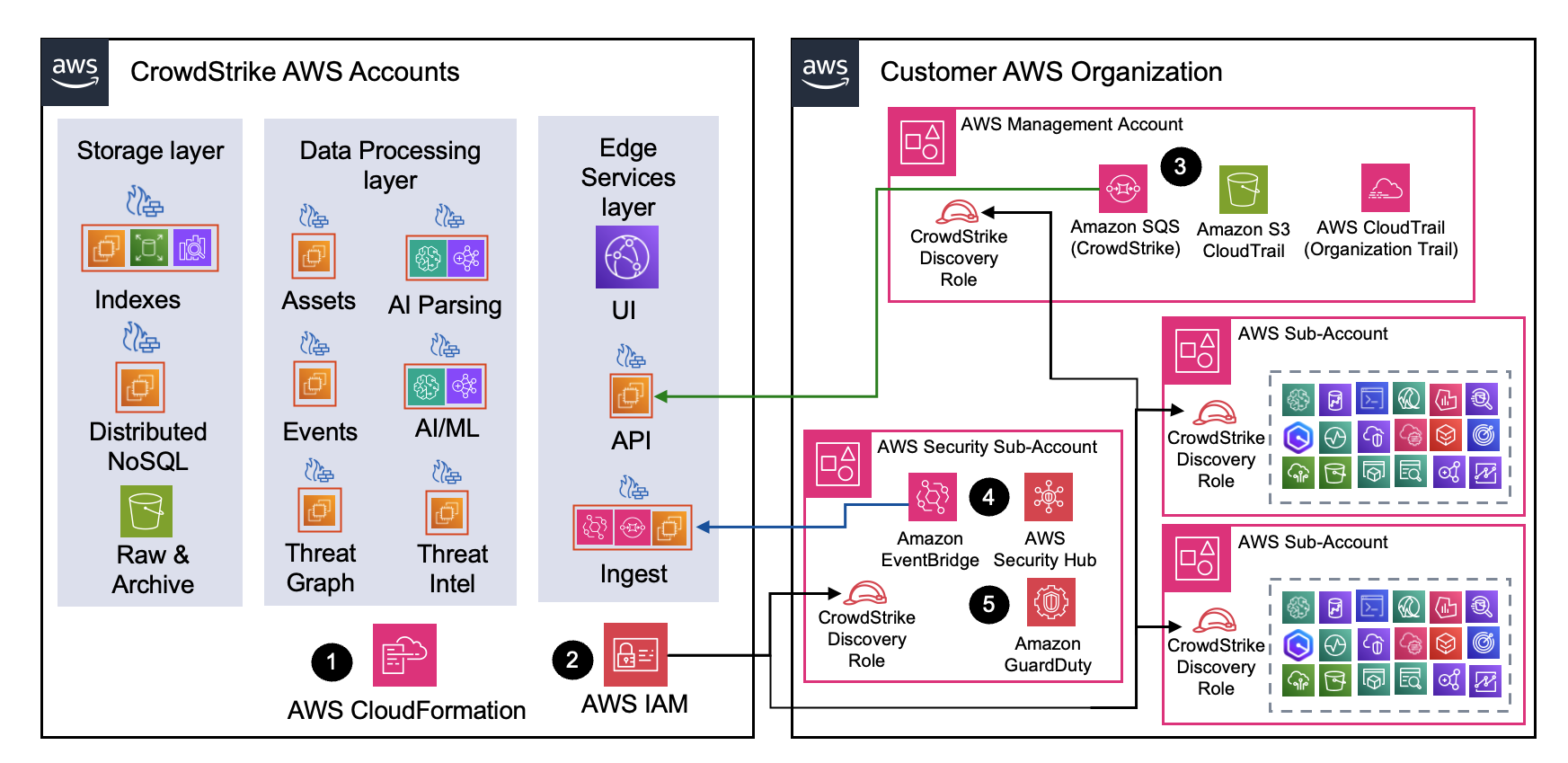
Figure 1: CrowdStrike Falcon Next-Gen SIEM for AWS architecture
Solution walkthrough: Deploy CrowdStrike Next-Gen SIEM for AWS through AWS Marketplace
In the following steps, we show you how to subscribe to CrowdStrike Falcon for AWS in AWS Marketplace. We then use the new launch experience to deploy Falcon Next-Gen SIEM. The solution follows a two-step process:
- Start your CrowdStrike Falcon for AWS subscription
- Deploy CrowdStrike Falcon Next-Gen SIEM for AWS
Start your CrowdStrike Falcon for AWS subscription
Follow these steps to subscribe to CrowdStrike Falcon for AWS in AWS Marketplace:
- In your AWS management account, open the CrowdStrike Falcon for AWS product detail page and choose View purchase options.
- Choose Subscribe.
- Your subscription might take a couple minutes to process. In the meantime, to begin the deployment integration process, click Set up your account (Figure 2).
- If you receive a dialog box to Enable AWS Marketplace deployment integration, choose Enable and continue.

Figure 2: Set up your account redirect
Deploy CrowdStrike Falcon Next-Gen SIEM for AWS
You will be taken to the new streamlined experience that will guide you through CrowdStrike authentication, Falcon Next-Gen SIEM for AWS configuration, and launch. Follow these steps:
- You will be redirected to the CrowdStrike account registration page. Follow the on-screen prompts to register with CrowdStrike. This can take 15 minutes for activation. Wait until you receive the account activation email before you proceed to the next step. .
- Return to AWS Marketplace and notice the success message indicating that your CrowdStrike account has been linked, as shown in the following screenshot. Choose Next.

Figure 3: CrowdStrike account linking confirmation message
- In the Configure deployment Rand access role section, keep the default parameters. Choose Next.
- In the Configure AWS CloudTrail i section, it will have selected the location where your organizational AWS CloudTrail for management events is configured. Keep the default parameters. Choose Next.
- In the Configure AWS Security Hub integration section, it will have selected the AWS account and home Region where either AWS Security Hub cloud security posture management (CSPM) or AWS Security Hub is configured. It will then create an Amazon EventBridge rule to send AWS Security Hub events to the CrowdStrike Amazon EventBridge event-bus for Falcon Next-Gen SIEM. Keep the default. Choose Next.
- In the Configure Amazon GuardDuty integration section, it will have selected the AWS account and Regions where Amazon GuardDuty is configured. It will then create an Amazon EventBridge rule to send Amazon GuardDuty events to the CrowdStrike Amazon EventBridge event-bus for Falcon Next-Gen SIEM. Keep the default parameters. Choose Next.
- In the Review and launch section, choose Deploy resources. During the next few minutes, the application integration and identity resources necessary to deploy Falcon Next-Gen SIEM, will be installed across all AWS accounts in your AWS Organization. Follow the on-screen prompts to access your new Falcon Next-Gen SIEM quick start connectors page, as shown in the following screenshot.
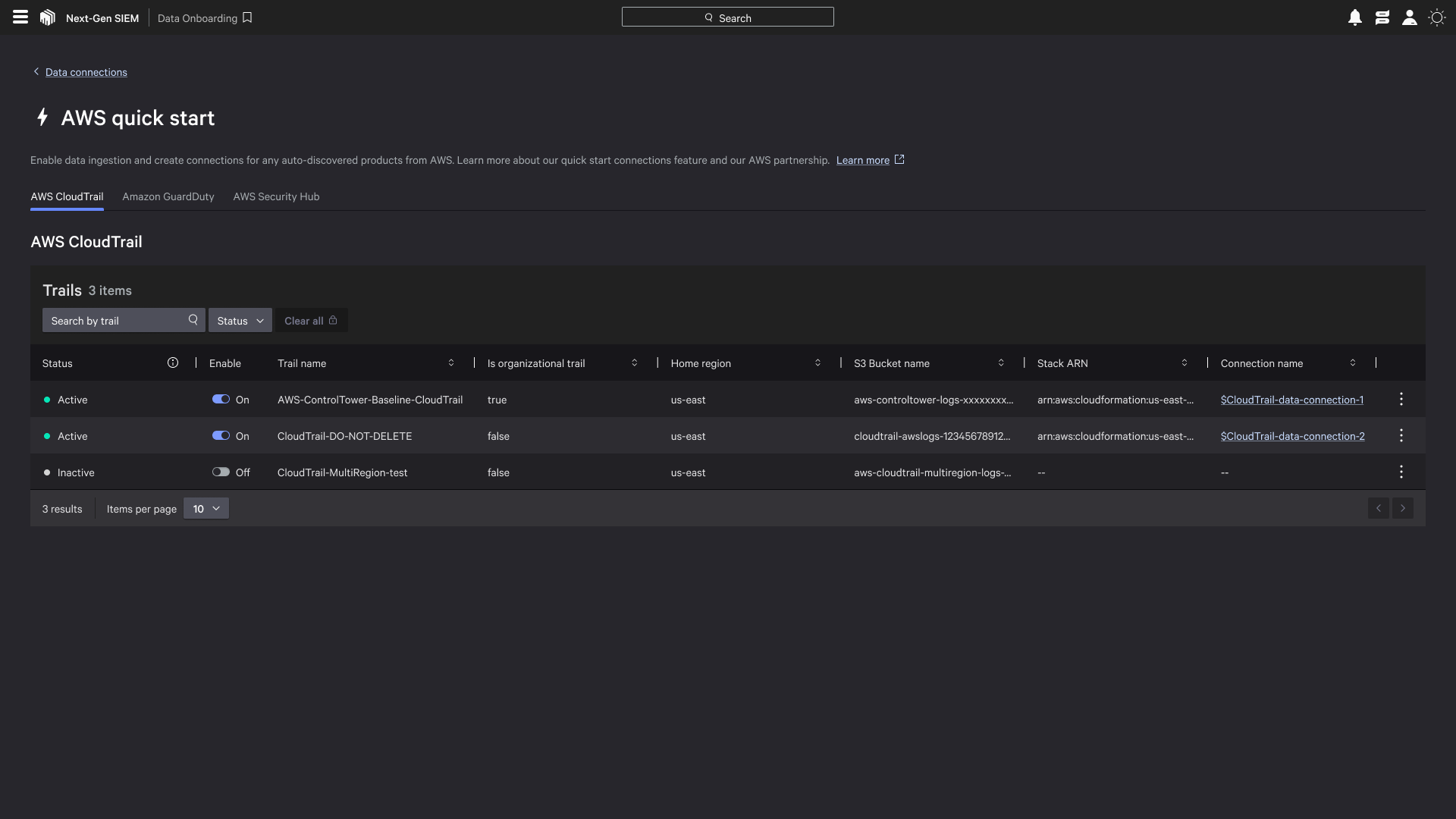
Figure 4: CrowdStrike Falcon Next-Gen SIEM quick start connectors page
Conclusion
In this post, we demonstrated how to subscribe to and use CrowdStrike Next-Gen SIEM for AWS available in AWS Marketplace. For more information, visit CrowdStrike Falcon for AWS.